
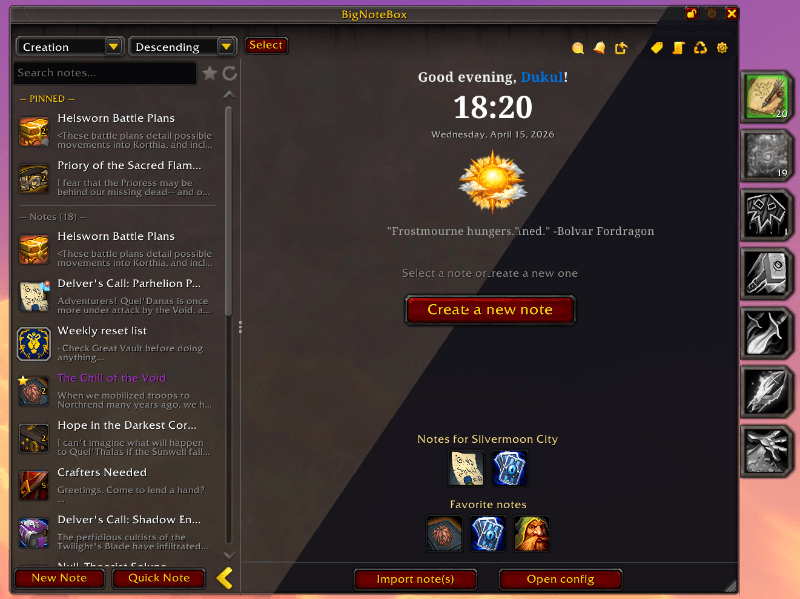
BigNoteBox is a full in-game notepad companion for World of Warcraft.
Create, organize, and manage unlimited notes directly inside the game. Notes are stored account-wide with optional per-character scope, allowing both global planning and character-specific tracking.
It has folders, a search that finds any note from anywhere, sticky notes, notes that show up in the right place, tasks, alarms, rich formatting, history, backups, sharing and much more.
You can download BigNoteBox from the official sources below:
BigNoteBox is only distributed through the official links above.
If you download it from any other website, it is not official, not maintained, and may be modified or unsafe.
Retail and WoW: Forever, and in beta on Classic Era, TBC Anniversary and Mists of Pandaria Classic. One download for every client.
- As many notes as you like, each with a title and as much text as you want
- Global or per-character scope per note
- Folders: drag notes in, give a folder a color; deleting a folder never deletes its notes
- Pin notes to the top, mark favorites, lock a note against edits
- Sort by creation date, last modified, title or your own drag order
- Duplicate, copy or move notes, alone or several at once in Select mode
Two ways to see your notes: the Note list beside the open note, or the Explorer view, a grid of icons over the whole window like the file explorer on your computer.
- Pinned, Folders and Notes sections that remember if they are open
- Pick several notes and drag them onto a folder
- Pinned first or Favorites first from the View menu
- Filter by tags, or to notes with tasks
A search bar that finds any note from anywhere in the game, by title, text or tag. Ctrl+Space or /bnb search.
- Enter opens the note; Shift as a sticky note, Ctrl in Focus mode, Alt in the Reference Box
- Prefixes narrow it down: player and NPC notes, items, zones, tasks, alarms, this character, today / this week
- Search the Trash or the settings, send a note to chat
#tag,@who,*favorites,-wordto leave a word out,"an exact phrase"
- As many tags as you like on a note, the same whatever their case
- Click a tag to show only its notes; the tag tree groups every note by tag
- The Tag Manager renames, colors and deletes tags across all your notes
- Notes save as you type (or with a Save button)
- Undo and redo per note, kept between sessions if you like
- Links to other notes, waypoint links, and links to a Settings page or help topic
- Templates: Blank, Boss, Weekly, Journal, or save any note as your own; share them as a code
- Note tokens fill themselves in:
{{date}},{{zone}},{{target}},{{coords}},{{ilvl}},{{item:6948}}and your own - Each note has its own icon, icon frame, border, background and font
A rich note is a small page, with a live preview beside the text. The tags are compatible with Total RP 3.
- Headings and paragraphs, left, centered or right
- Colored text with a color picker
- Game icons, game art (atlas) and your own pictures
- Clickable links; item and spell links show their tooltips
- Shows as a page on sticky notes too
- F7 makes a new note at once, in the main window or as a sticky note
- Quest, gossip, book and letter windows get a note button: one click keeps their text
- Dialogue UI and Immersion get the same button
- Write in full screen with the game interface hidden
- The camera slowly circles your character (or not)
- A rich note gets its preview beside the text
- Esc brings everything back as it was
- Pin any note to your screen; up to 50 at once (20 by default)
- Each sticky has its own font, size, color, background and border
- A note with tasks can show its tasks, ticked right on the sticky
- Stickies can stay on the Esc menu screen instead of the game screen
- Ctrl+H shows or hides every sticky, Ctrl+J brings them to the front
A note shows up by itself where it matters, as a toast or a sticky note.
- A zone, sub-zone, instance or instance type (dungeon, raid, delve, battleground)
- A player, an NPC or a guild
- A window: vendor, bank, mailbox, auction house or trainer
- Being rested, in an inn or in a city
- When it starts, ends or both; every time, once a session, a day, a reset or only once
- A situation can place waypoints
- Toasts: choose which show, where, how they look and how long they stay
- Checklists with sub-tasks inside any note
- Untick themselves at the daily or weekly reset, the whole list or one task at a time
- Tick them on a sticky note
- One button shows only notes with tasks
- Ring at a real-world time, an in-game time, or the daily or weekly reset
- Once, or on the days you choose
- The note pops up with a sound; snooze or dismiss
- The alarm list shows every alarm
- Items, spells, quests and links attached to a note, beside the editor
- Drag them in, or Shift-click a link while it is open
- A note about a player keeps their gear, with a model viewer and a transmog view
- Ctrl-click a gear card to open the dressing room
- A note about a player from the Inspect window or their right-click menu, about an NPC with F6
- Portrait and details filled in, a player's gear in the Reference Box
- tl;dr: one short line (like KOS) that shows in their tooltip
History and kept undo live in the BigNoteBox_History addon, which comes with BigNoteBox.
- A version of each note is saved when you log out or reload
- Compare two versions side by side and bring an old one back
- Restore points by hand before a big change
- Rescue a note that went missing without being deleted
- Deleted notes wait in the Trash for 30 days (you choose how long)
- Full backup: notes, templates, tokens, tag colors and every settings profile, as JSON
- Settings backup, and a Selective backup in JSON or Markdown
- Import takes backups, shared notes, template codes and profile codes
- Export a note as HTML in three styles
- Move your notes over from OneWoW Notes, Noteworthy II, Take A Note, Yet Another Notepad, Notepad, Notes, TinyPad, PurpleNotes, SimpleNote, Quick Notes, MyNotepad and AmmeNotepad: see them before they come in, nothing is removed from the other addon
- Share a note with what goes with it: tags, tasks, Reference Box, look, situation, player or NPC data
- Send it straight to another BigNoteBox user, or as a share code
- Send to Chat posts the note's text in a chat channel, line by line
BigNoteBox works on its own. With BigChatBox installed you can also send a note to chat through it and capture chat into a note.
- Blizzard's own window look by default, or Skin mode in 14 colors (OLED and OLED Flat among them) with a brightness slider
- Bundled fonts, OpenDyslexic among them, plus every LibSharedMedia font you have
- Accessibility: turn off or slow down the sticky note animation
- Switch whole parts on or off; Minimal, Full and Custom switch many at once
- Your notes keep everything, so switching a module back on brings it all back
- Settings profiles per character, shared as a code
The help book has every help topic in chapters, with a search: the Help button at the top of the main window, or /bnb help.
| Key | Does |
|---|---|
| Ctrl+N | Open or close BigNoteBox |
| F8 / F7 / F6 | New note / quick note / note from your target |
| Ctrl+Space | Oracle search |
| Ctrl+H / Ctrl+J | Hide or show stickies / stickies to the front |
Commands: /bnb, /bnb new, /bnb search <text>, /bnb config, /bnb whatsnew, /bnb features, /bnb help, /bnb commands.
Reset the profile in use or every setting, clear the trash or the history, reset sticky layouts, delete all notes, factory reset, re-run the setup wizard. Take a backup first.
Working on BigNoteBox itself? The developer tools are a separate addon, BigNoteBox_Dev, downloadable from each GitHub release. You do not need it to use BigNoteBox. See DEVTOOL.md.
The code is licensed under the GNU General Public License v3. The BigNoteBox and BigChatBox logos and the addon icon are All Rights Reserved, and the rest of the art is World of Warcraft art belonging to Blizzard Entertainment: see LICENSE-ASSETS. Bundled libraries and fonts keep their own licenses. Releases up to v1.22.x were MIT licensed.