
There are currently three storage examples available.
In the example instructions below pdo can be replaced with mongo or mongodb
cd examples/pdo
composer install
./load.phpcd ..
php -S localhost:8888 -t pdo pdo/index.phpcurl -X POST -d client_id=librarian -d client_secret=secret -d grant_type=client_credentials http://localhost:8888/token{
"access_token": "c859d2c9eec4800a6277671eba72a5a6f54f8693",
"expires_in": 3600,
"token_type": "Bearer",
"scope": "bookCreate"
}
curl -H 'Authorization: Bearer c859d2c9eec4800a6277671eba72a5a6f54f8693' http://localhost:8888/books?limit=2{
"offset": 0,
"limit": 2,
"total": 11,
"books": [
{
"id": "58339e95d5200",
"author": "Gambardella, Matthew",
"title": "XML Developer's Guide",
"genre": "Computer",
"price": 44.95,
"published": 970372800,
"description": "An in-depth look at creating applications with XML."
},
{
"id": "58339e95d5239",
"author": "Ralls, Kim",
"title": "Midnight Rain",
"genre": "Fantasy",
"price": 5.95,
"published": 976942800,
"description": "A former architect battles corporate zombies, an evil sorceress, and her own childhood to become queen of the world."
}
]
}
curl -i -X POST -H Content-Type:application/json -H 'Authorization: Bearer c859d2c9eec4800a6277671eba72a5a6f54f8693' -d @create.json http://localhost:8888/booksHTTP/1.1 201 Created
Host: localhost:8888
Connection: close
X-Powered-By: PHP/7.0.8-0ubuntu0.16.04.3
Content-Type: text/html; charset=UTF-8
Location: /books/5835a5df8a29c
Content-Length: 0
The body of the response will be empty. The http status code will be 201 and there will a location header with the url for the new book Location: /books/5835a5df8a29c
curl -H 'Authorization: Bearer c859d2c9eec4800a6277671eba72a5a6f54f8693' http://localhost:8888/books/5835a5df8a29c{
"id": "5835a5df8a29c",
"author": "Galos, Mike",
"title": "Visual Studio 7: A Comprehensive Guide",
"genre": "Computer",
"price": 49.95,
"published": 987393600,
"description": "Microsoft Visual Studio 7 is explored in depth, looking at how Visual Basic, Visual C++, C#, and ASP+ are integrated into a comprehensive development environment."
}
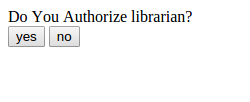
Navigate to http://localhost:8888/authorize?response_type=code&client_id=librarian&state=xyz
--
Click 'yes'
--
Request an access token using the authorization code
curl -u librarian:secret http://localhost:8888/token -d 'grant_type=authorization_code&code=437a8960671a751106196e8205979ab75c10db04'{
"access_token": "6c44c025a5a3116072e179c2893466b4c346a6b5",
"expires_in": 3600,
"token_type": "Bearer",
"scope": null,
"refresh_token": "1b0fde4b878bddbb955784fa447b19fca9558abd"
}