
⠀ ⠀
⠀
More immersive, more realistic. A bullet's a bullet, and Night City is full of hardened gangoons with hair triggers and bad attitudes. But they've never run into anything like you.
⠀
More than just a collection of other modders' amazing work, we are actively developing new mods to add gameplay elements that support our vision. We provide a fully preconfigured and easy to use modded experience; it just works, plug n' play.
⠀



Mod Organizer 2 and Cyberpunk 2077 aren't normally compatible - using MO2 on the game leads to CET and Redscript errors. This has been addressed through a plugin called Root Builder that allows specific folders to be automatically be copied into the game folders when launching the game, and be automatically cleaned up once the game closes. Root builder requires a specific folder structure. The archive folder of mods is MO2 deploys via its Virtual File System (VFS), this works in 99% of cases for mods of this type. The other folders are copied before runtime, namely: bin, engine, r6, red4ext and Redmods. This way your game folder remains intact when not run via MO2. This means under all practical purposes, these mods are installed manually, but with the convenience of a mod manager.
While most mods will work, there are a few that do some archive checking and thus require manual installation outside of MO2
⠀

⠀
For premium Nexus users installing this Wabbajack is a one click process
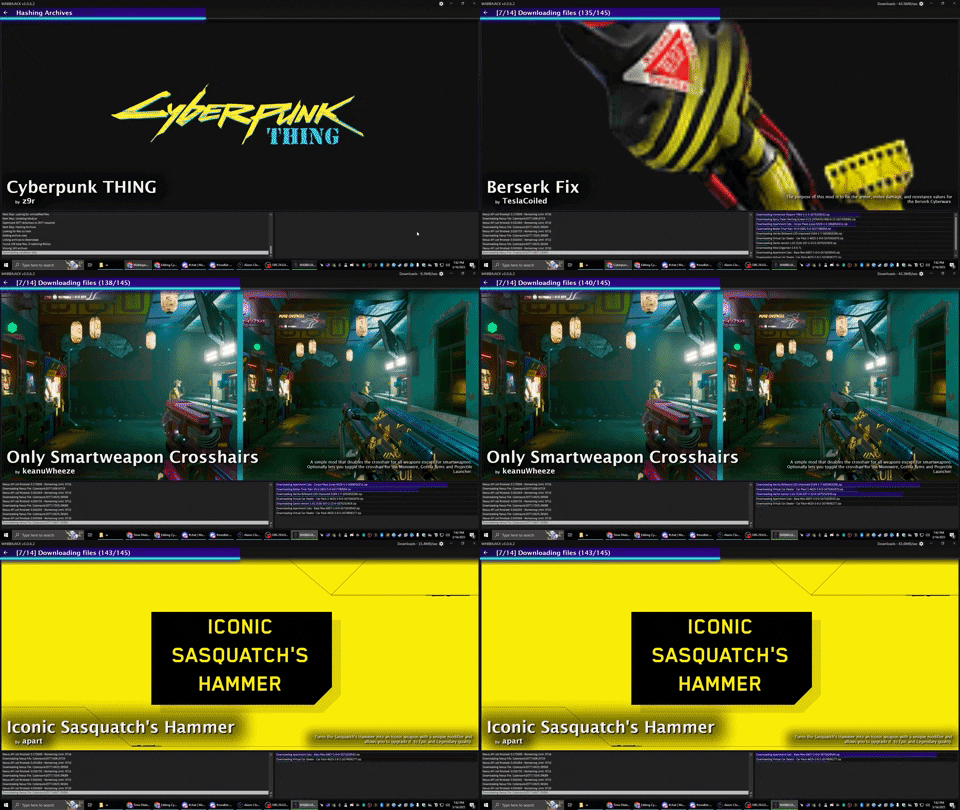
For non-premium users, the installation process is still simple. You just have to click "Download" followed by "Slow Download" as Wabbajack brings up buttons for every mod
⠀
⠀
If you've ever modded Cyberpunk before, it's important to ensure you have a clean game folder
Go to your main Cyberpunk 2077 directory and delete the all folders except for "archive"
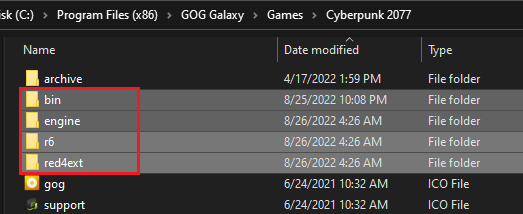
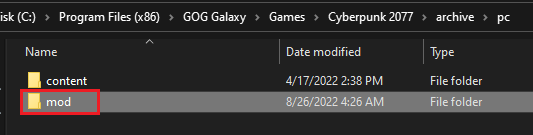
Additionally delete the "mod" folder in "Cyberpunk 2077/archive/pc/"
Now make sure you go and verify your game files through Steam or GOG
If you have used Vortex before, please purge the installed mods, you will be able to redeploy them later if you choose to
This Wabbajack list does not work with the Epic version of Cyberpunk 2077
⠀
The Steam/GOG Overlay can cause issues with certain mods and is recommended to be turned off
Steam: Open the Properties window (right click the game in your Library->Properties), navigate to the General tab and un-tick the Enable the Steam Overlay while in-game checkbox
GOG: Open the settings window (Cog in the top left of GOG Galaxy), navigate to the Game Features tab and un-tick the Overlay checkbox
Cyberpunk 2077 is still being updated by CDPR. Whenever the game updates, it's quite possible that everything can break due to these changes
Steam: To ensure that Steam does not automatically update the game unless you want it to, head over to the Properties window, navigate to the Updates tab and change Automatic updates to Only update this game when I launch it
GOG: To ensure that GOG does not automatically update the game unless you want it to, head over to the Settings window, navigate to the Game Features tab and turn off the checkbox for Auto Update Games
⠀
Grab the latest release of Wabbajack from here
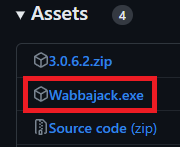
Place the Wabbajack.exe in a location like C:\Wabbajack
Wabbajack can be installed to any folder as long as it is on the same hard drive as
your Cyberpunk 2077 game directory
The download and installation process depends on your system specs. Wabbajack will calculate the amount of threads it will use at the start of the installation
To have the highest amount of threads and thus the fastest speed, it is advised to have the working folder on an SSD, this doesn't matter a huge deal for the modlist itself however it will matter when playing the game
- Open Wabbajack
- Load the Modlist by clicking "Browse Modlists" (selecting the Cyberpunk 2077)
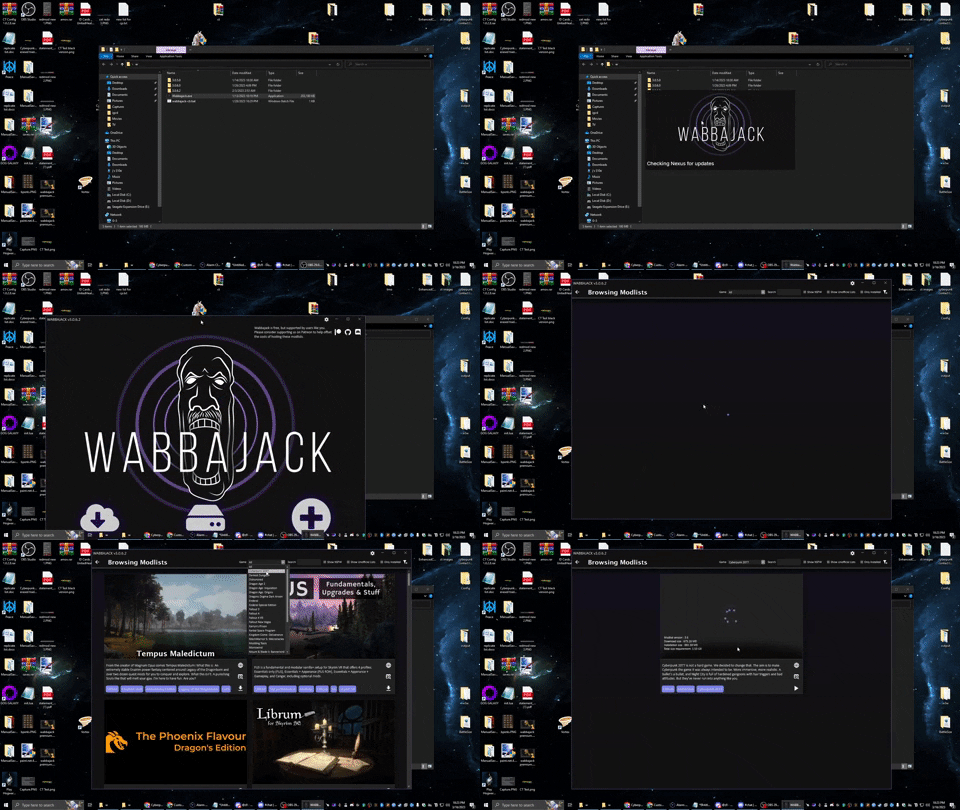
- Set Cyberpunk THING to install to
C:\Cyberpunk THINGand downloads toC:\Cyberpunk THING\DownloadsYou can set a different path if you wish, but avoid system protected folders.
Avoid installing the list to a system protected folder like Program Files, ensure the list is installed to a different location
than the folder Wabbajack.exe is located in
- Click the Go/Begin button
- Wait for Wabbajack to finish
There are a lot of different scenarios where Wabbajack will produce an error. If you do not see an installation failed warning do not worry about it. If you feel like wabbajack is stuck or a download is hanging just restart wabbajack, it will pick up from exactly where you left off
Please rerun wabbajack at least twice and try to manually download the file from first before posting about a failed download
Could not download x
If a mod updated and the old files got deleted, it may be impossible to download them. In this case just wait until there is a list update
Wabbajack could not find my game folder
You need to have launched the game once before WJ will locate it. The list works with the GOG or Steam version of the game
Support in Cyberpunk THING discord
⠀
In order to use the included mod Simple Flashlight open the "Game Folder Files" folder in your modlist install location, and copy the archive folder into your main Cyberpunk 2077 directory
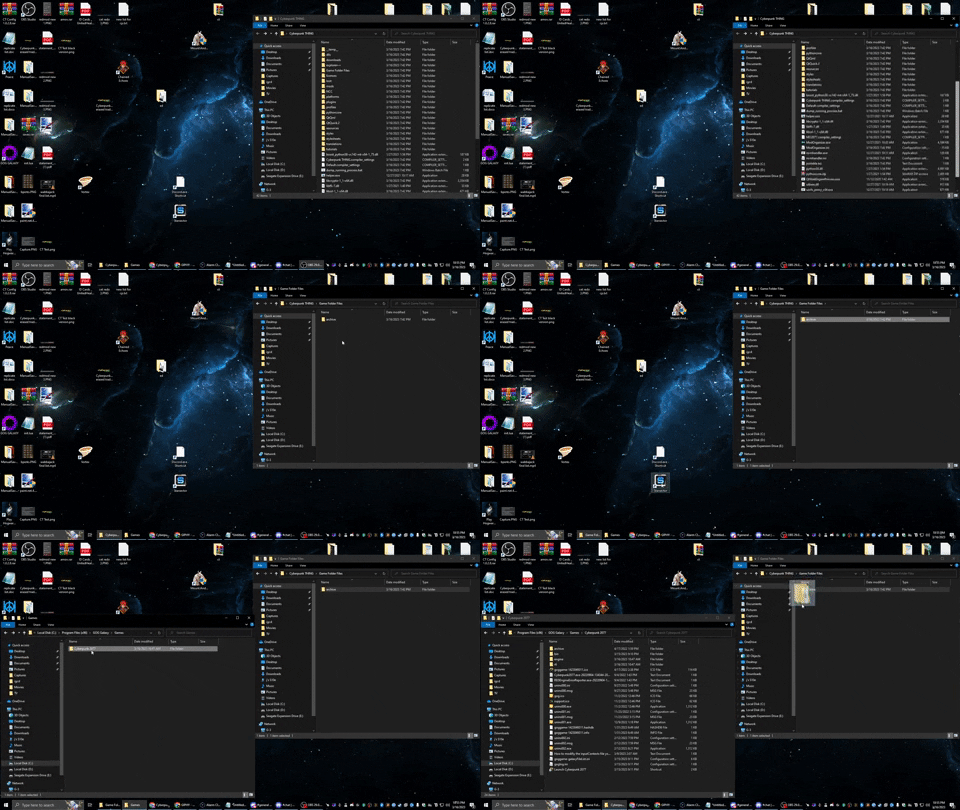
Head over to the installation folder and locate an executable named ModOrganizer.exe and launch it. Once its launched there will be a dropdown box on the top right and a big run button next to it
Ensure it is set to Cyberpunk 2077 by selecting it in the dropdown
box and then hitting the run button. Due to how it is deploying the files, you may have to click "Run" twice. This is normal
⠀

⠀
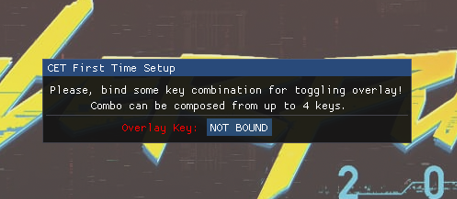
When you start the game for the first time you will be met with an overlay prompting you to choose a key to toggle on Cyber Engine Tweaks, recommend that you choose the "~" key for the "Overlay Key"
Keybinds for "BetterScopes", "NanoDrone", "QuestTrackingToggle" are as follows:
Additional weapon zoom is Shift
Quest Tracking Toggle is F11
NanoDrone forwards, left, backwards, and right is w a s and d, and up and down are Space and Control
Any of this can be changed by hitting your bound CET Overlay Key and going to "Bindings"

⠀
⠀
In Cyberpunk, there is no way to bind multiple hotkeys for actions, items, or abilities, as each must be assigned through the menu to the one assignable hotkey at a time, leading to gameplay interruptions if you want to play well. Custom Quickslots solves this issue by allowing bindable hotkeys which show up on the Native game UI and allow you up to 20 hotkeyed actions, abilities, or items. Some small setup is required
Navigating the Mods menu uses the arrows at the top to switch between the different pages of mods
After clicking "Mods" in the main menu, navigate to the "QSLOTS" section, you can add slots and then select the key they bind to. This will need to be duplicated in CET Bindings in order for it to work. Recommend adding slots as needed during the course of gameplay
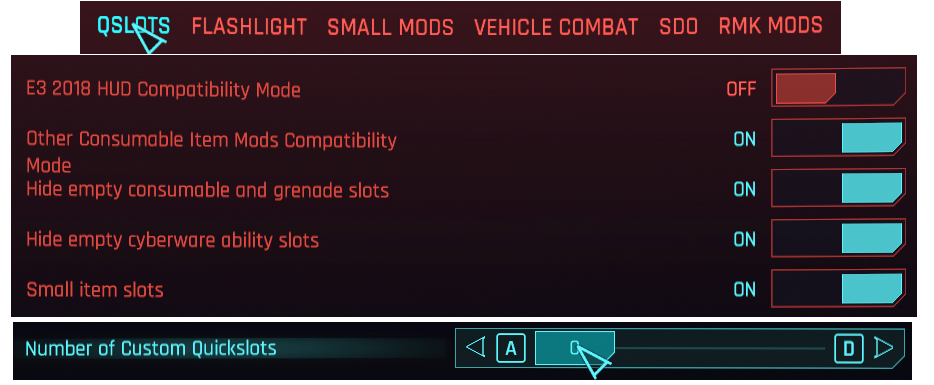
⠀
⠀
This collection is built around the very hard difficulty setting
After clicking "Settings" in the main menu, near the left side of the top menu click on the "GAMEPLAY" section, recommend changing "Aim Assist" and "Aim Assist - Melee Combat" to "Off"

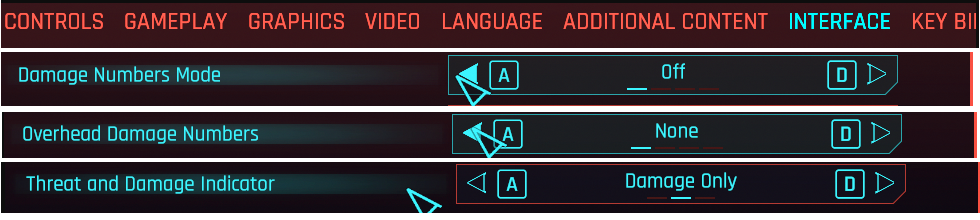
Near the right side of the top menu click on the "INTERFACE" section, recommend changing "Damage Numbers Mode" to "Off," "Overhead Damage Numbers" to "None," and "Threat and Damage Indicator" to "Damage Only"
Further down in the "HUD Visibility" section, recommend keeping all on except "Hints," "Activity Log," and "NPC Names"
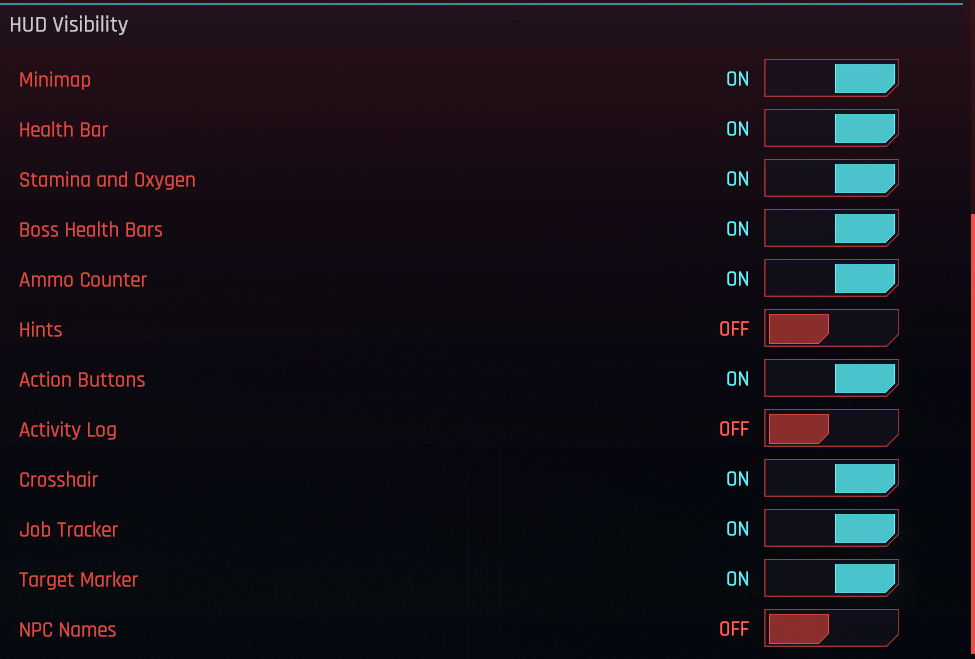
New players may want to keep "Hints" on until they feel they no longer need them
⠀
⠀
Several mods in the collection have been adjusted with permission from their mod authors. You are limited to using the Techdeck from Drone Companions as an alternative to a cyberdeck rather than something that can be run in tandem. The movement changes from Alternate Midair Movement and Walljumping are now part of the Maneuvering System cyberware.
⠀
If this Modlist receives an update please check the Changelog before doing anything. Always backup your saves or start a new game after updating
Wabbajack will delete all files that are not part of the Modlist when updating!
This means that any additional mods you have installed on top of the Modlist will be deleted. Your downloads folder will not be touched! That means if you have made your own modded setup on top of the list, you should update those mods manually.
Updating is like installing. You only have to make sure that you select the same path and tick the overwrite existing Modlist button
After an update, go to V's original apartment and into the stash room to reset NCI
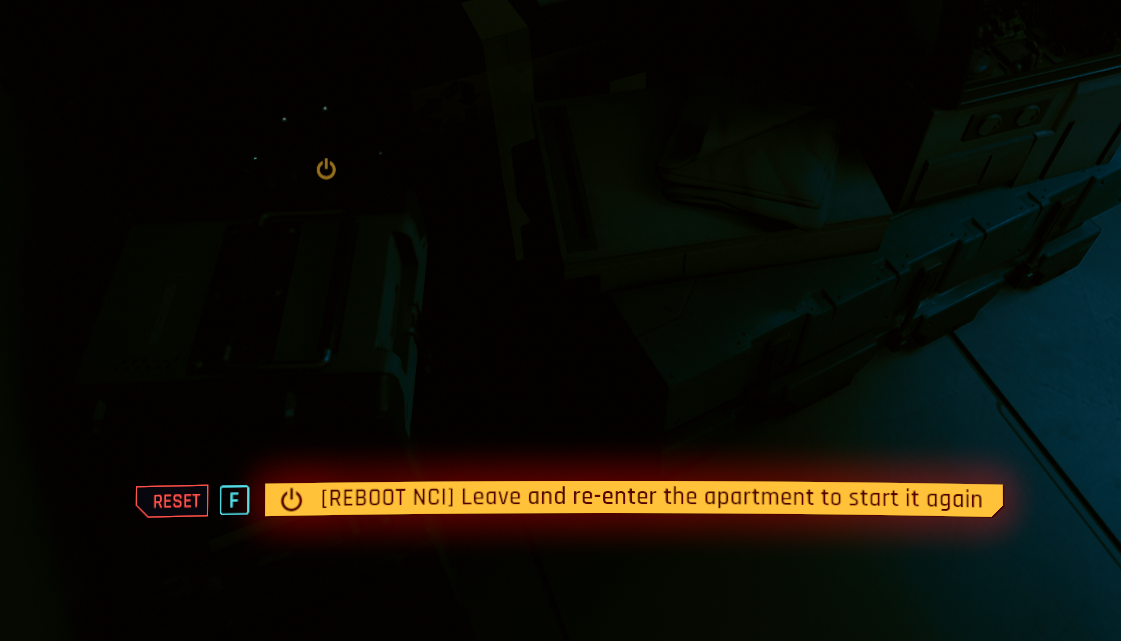
Then leave the apartment and reenter to complete the reset
You can just remove the MO2 folder, along with any Game Folder file mod you've installed and be done with it
⠀
Answers to common troubleshooting or game balancing questions can be found on our FAQ page
Our FAQ page is a treasure trove of information that we’ve gathered from answering users' questions over time. If you have an issue, we highly recommend you check if it's already been answered. And if not, you can always find us on our Discord server :)
⠀
When things gets heated I need to back out, run, hide, jump on buildings, reposition, go around the block to take them from behind, peek a boo. You never know where they coming from, always on the look out for an exit, a plan b. Fighting these gangoons really feels satisfyingly now and the city layout has become part of it. Initially was a struggle but then I adapted, learned, with experience I become a better merc, not just with the levels and powers meta, but in the way you play, actually. it plays more as an open world city game now. the best there is
Honestly, this collection is just great. It has basically fixed ALL the major complaints I had with the vanilla game. I'm about 10 hours in with a full hacker build and truly loving the challenge. No more cheese mode see everything through walls, or slowing down time for 20 seconds over and over and over again.
Read about more people's experiences with the list here
⠀
A special thanks to TeslaCoiled, without whom this crazy experiment would never have gotten off the ground.
This could not have been done without the Cyberpunk modding scene at large. They have taken what could have been a forgettable game and turned it into an unforgettable experience.
Additional thanks and credits to:
- Deristat for playtesting, QA and feedback
- moLy, Busy Oscar, and the rest of the Cyberpunk THING Palace of the Mind for suggestions, ideas, and vision
- Bobbytronics for the wonderfully customized version of Alternative Midair Movement
- vahndaar for the bundled mods "Takedown and Dispose Rewards," "Fix Level Up Notification," and "Fistfight Armor"
- Leon Maxwell for their unofficial Vehicle Combat fix
- walrus420 for the incredible Cyberpunk THING logo!
- SOSUINEPXISUYU for the beautiful and striking screenshots.
- General namedrops for specific help and utilities: psiberx, KeanuWheeze/Nexusguy999, scissors, rfuzzo, KiroCobra, and the Cyberpunk 2077 modding Discord!
- Can't forget the WolvenKit Team, the Cyber Engine Tweaks team, and the redscript team for making the tools all modders use, and the modding Discords in general for being a font of information!
- JTK from the Wabbajack team, as well as Xanza, Delta, and Crit for making MO2 for Cyberpunk a reality
Remember to endorse the mods in this that you enjoy: the people who made these mods are the only reason this exists.
For support or to give feedback you can reach us at the modlist discord link below:
