
Give everyone in the house their own Home Assistant.
Guests see the lights. Kids get their own dashboard. Nobody but you touches the locks, the add-ons, or the settings.





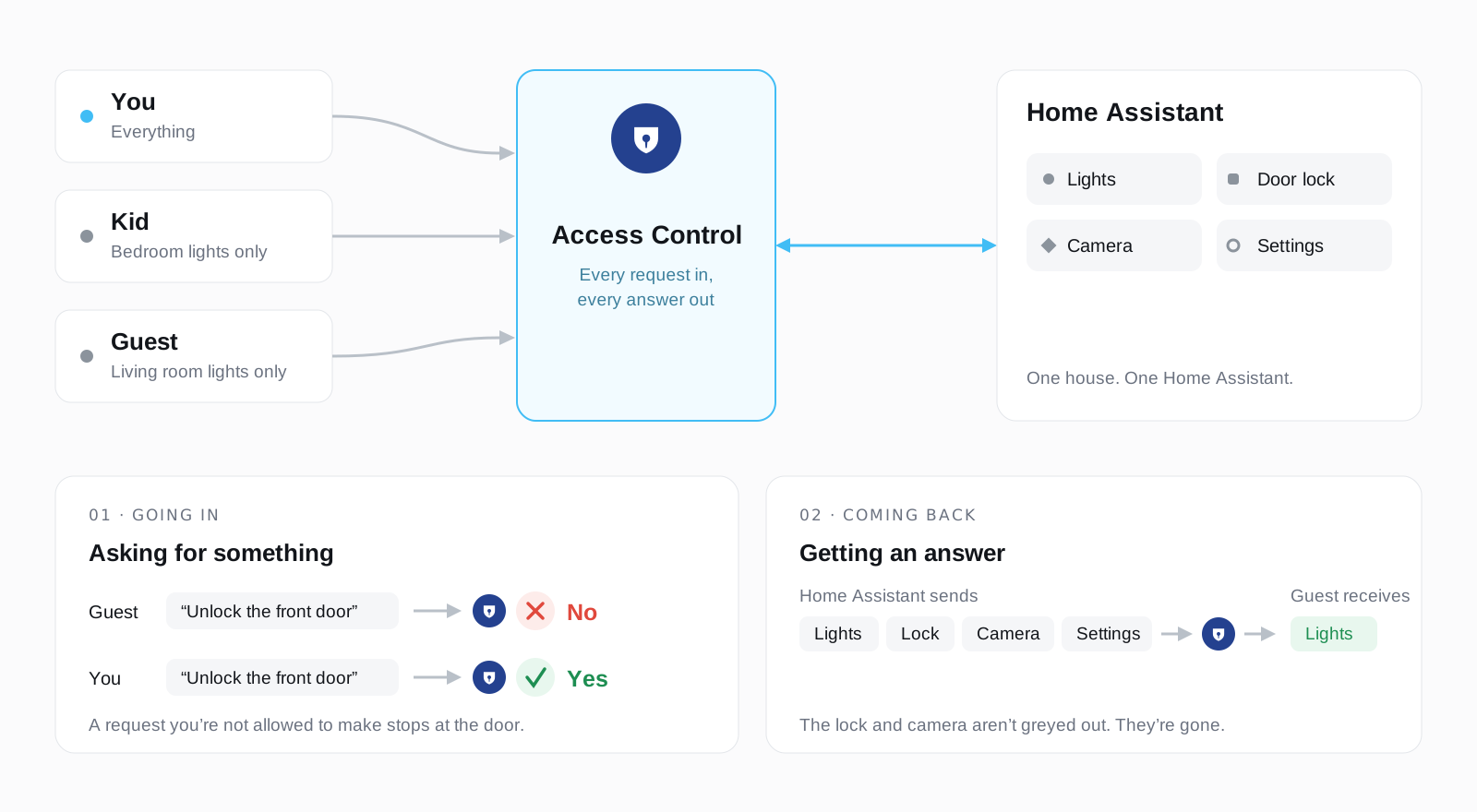
Everyone talks to the same Home Assistant. Each person only ever gets their own slice of it.
Home Assistant has two kinds of user: administrator, and everyone else. "Everyone else" still sees every camera, every lock and every sensor you own. There's no way to hand a guest a dashboard with just the living room lights on it, or to give your kid a tablet that can't open the front door.
This adds roles. You decide what each one can see and do, then hand them out.
It isn't only for people. Point an AI assistant or agent at Home Assistant through its own restricted login and it's held to the same role. It reads and changes exactly what you allowed, and nothing else. A useful fence to put around what an LLM can do in your home.
| What they see | By area, domain, label, floor, or one particular device. Nothing in the bedroom. No locks. |
| How much | Look only, or look and touch. |
| What stays private | Hide details: where someone is, a door code, a serial number. |
| Where they can go | Which dashboards, add-ons and screens are in their sidebar. |
| Which options | On a dropdown of people or modes, the ones they may choose. The kids can announce as themselves, not as you. |
| Whose past | History and logbook per entity, on top of what they can see live. The thermostat's trend on the shared dashboard, without the thermostat. |
| When | Days and hours. A cleaner, weekdays 9 to 5. A babysitter, Friday evenings. |
| What they can change | Nothing, everything, or one part of the settings: automations, dashboards, helpers, users, backups. |
Hidden means hidden. A restricted device isn't greyed out, it's absent: from the dashboard, from search, from history, and from the API.
Four roles to start from: Administrator, Editor, User and Read only. Copy any of them and change it.
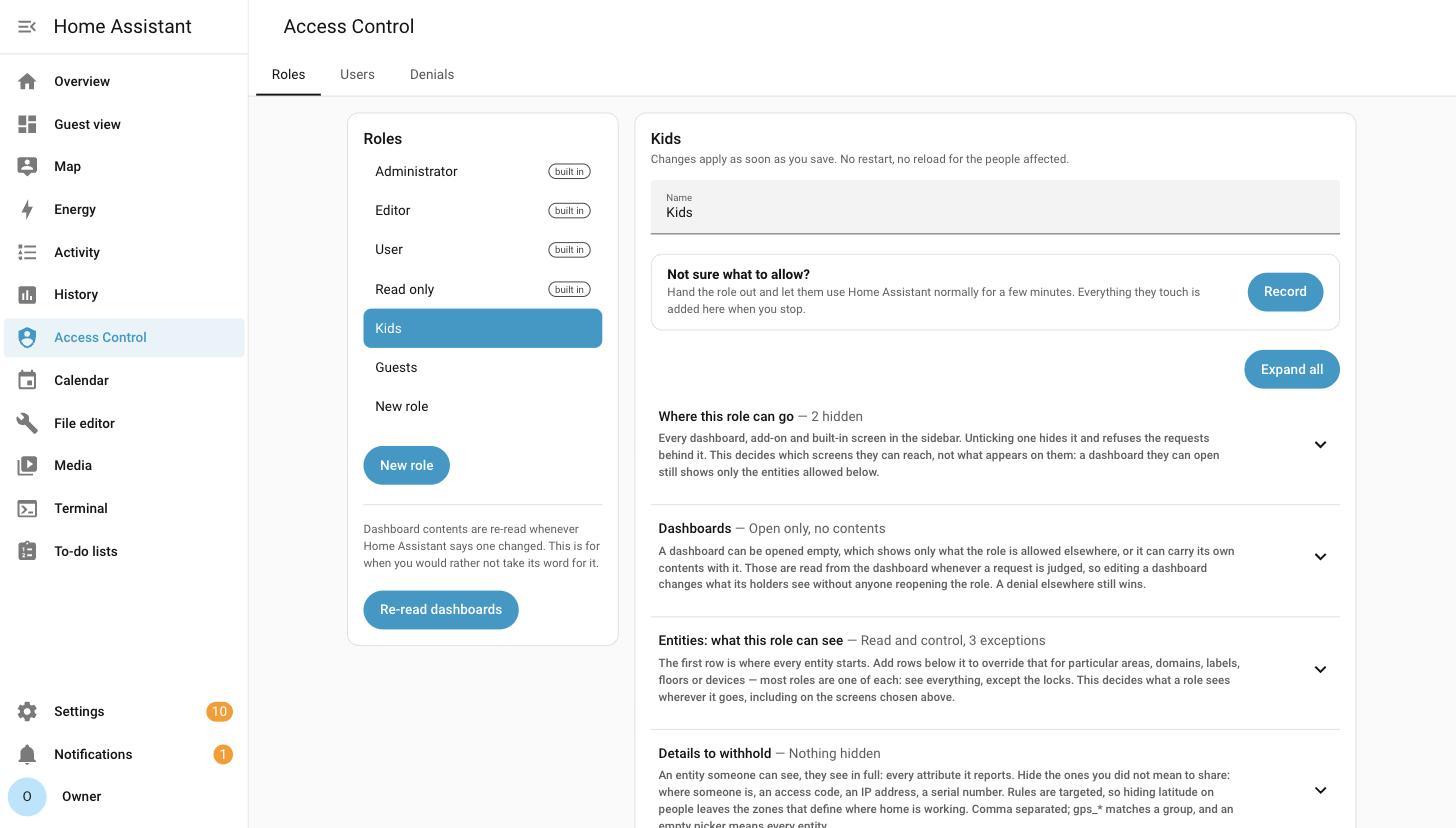
One role at a glance: where it can go, what it can see, what it can change. Each line opens. |
|
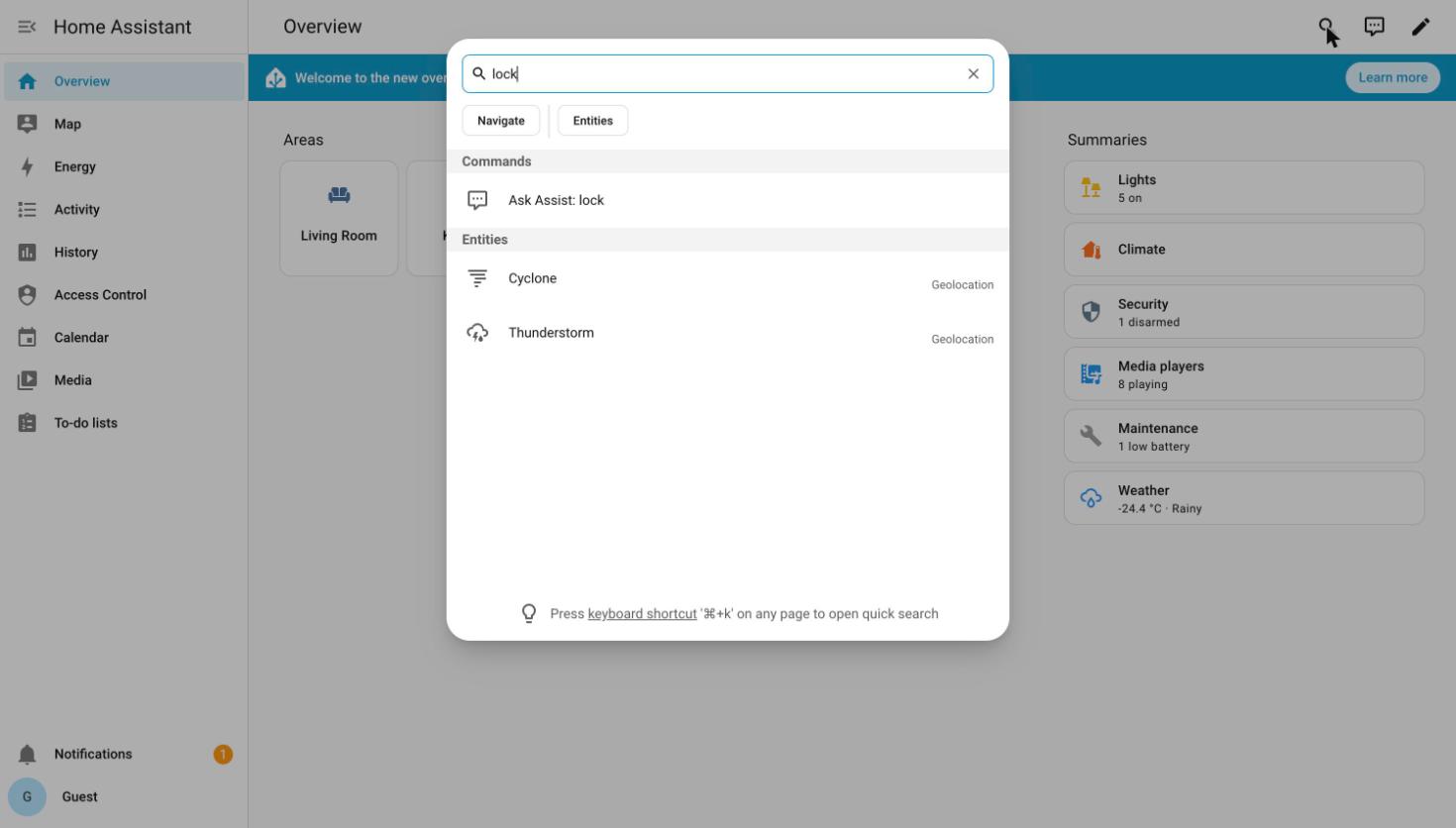
A guest searching for "lock". There's nothing to find. |
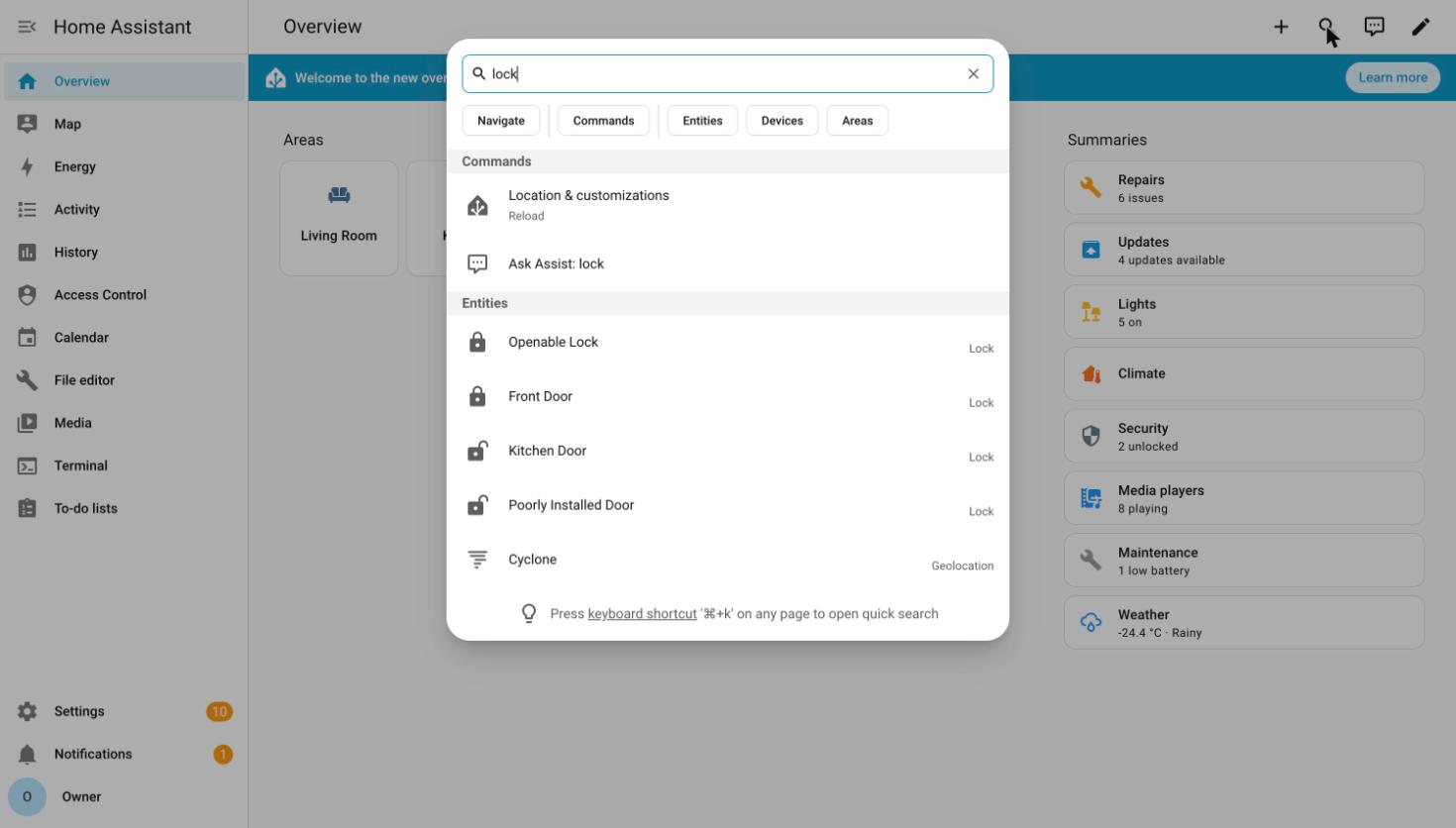
The same search, same house, signed in as yourself. |
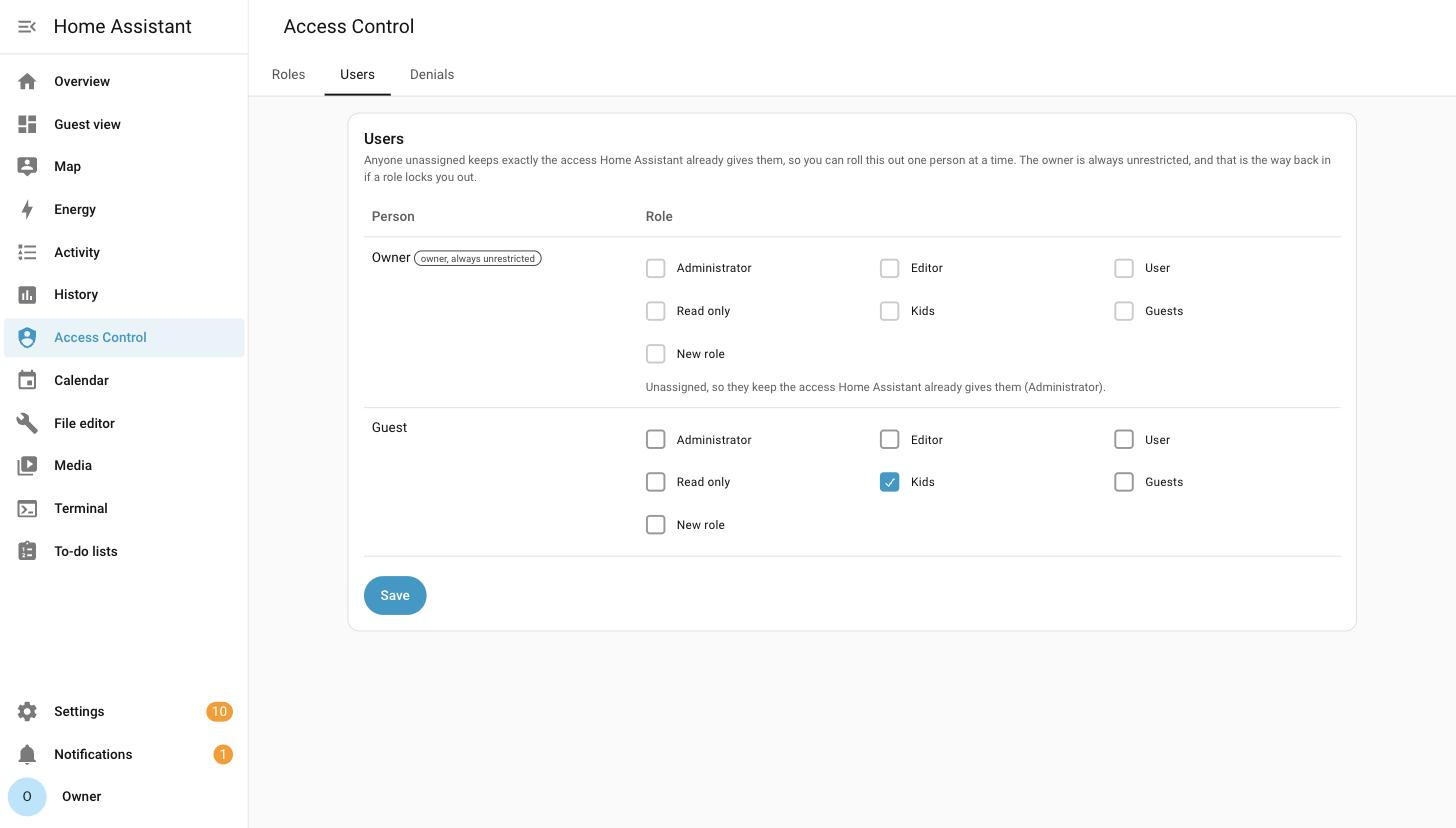
Who gets what. |
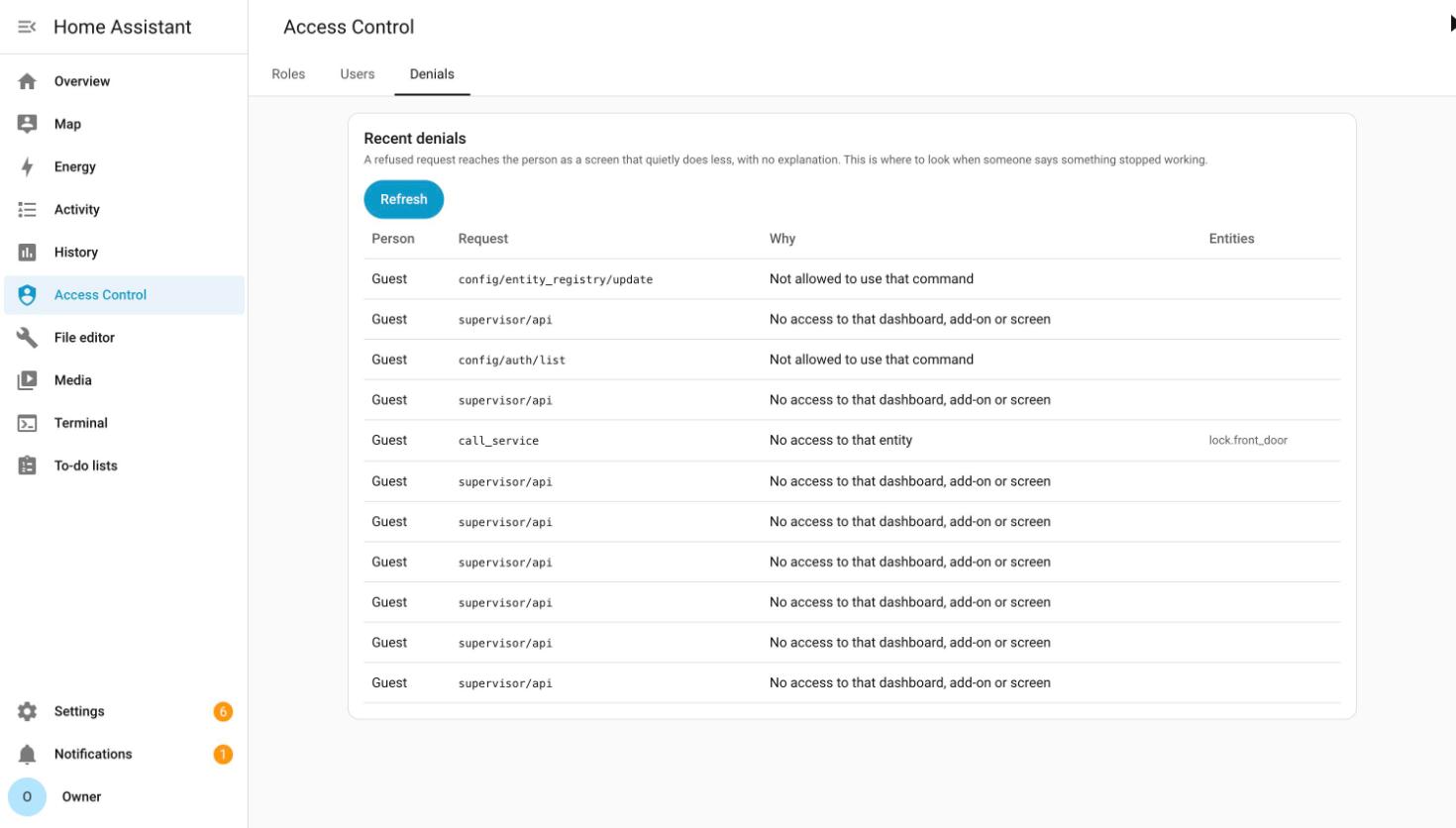
When someone says "it stopped working", look here first. |

That button adds this to HACS. Download, restart, then add Access Control from Settings → Devices & Services and say yes when it offers to move Home Assistant for you.
Home Assistant restarts once and comes back about fifteen seconds later. The address doesn't change, so bookmarks, the companion app and your Google or Alexa setup keep working, and nobody gets signed out.
If it doesn't come back, Home Assistant undoes the change by itself within five minutes and restarts on the port it was on before.
Why does Home Assistant have to move?
Roles are applied to traffic passing through this integration, so Home Assistant has to stop answering on your network directly. Otherwise anyone could go straight round it with the login they already have.
So Home Assistant moves to a port reachable only from its own machine, and this takes over the address everyone already uses.
Prefer to do it yourself? Decline the offer, then set Server port to 8124 under Settings → System → Network, add Access Control, and finally set Server host to 127.0.0.1. In that order, because each step leaves you with a Home Assistant you can still reach.
If the button above doesn't work, you can add this repository manually to HACS:
- Open HACS in Home Assistant
- Click the menu (⋮) and select Custom repositories
- Add the repository URL:
https://github.com/FezVrasta/ha-rbac - Select Integration as the category
- Click Create
- Click the new Access Control card
- Click Download
- Restart Home Assistant
- Go to Settings → Devices & Services and add Access Control
If you prefer to install manually:
- Download the latest release from the releases page
- Extract the
ha_rbacfolder - Copy it to your Home Assistant
config/custom_components/directory - Restart Home Assistant
- Go to Settings → Devices & Services and add Access Control
- Open Access Control in the sidebar.
- Copy Read only, call it Guest, and add what they may see.
- Go to Users, pick the person, choose the role, save.
Have them reload. Their Home Assistant is now smaller.
Nothing changes for anyone until you give them a role, so you can do this one person at a time.
Not sure what to allow? Hit Record what this role needs, let them use Home Assistant normally for a few minutes, and stop. Everything they touched is added to the role, so you build it from what they actually use instead of guessing and then chasing what broke. While it records they have full access, and the panel says so.
You can't lock yourself out. The owner account always keeps full access.
Not everything goes through it. Automations, add-ons and webhooks reach Home Assistant by other routes, and so does anyone with a login to the machine itself. Roles don't apply there. There's a plain list of what's covered and what isn't.
It's an alpha. Tested, and deliberately attacked twice (two adversarial reviews by its author, no external audit yet), but it hasn't lived in anyone else's house yet. Try it on something that isn't your front door, and tell me what broke.
It sits in front of Home Assistant and reads everything going past. When a guest's browser asks what's in the house, it answers with their part of it. When something asks to unlock a door it isn't allowed to, it says no.
It ships no list of what's dangerous. Home Assistant already marks its own administrative features, and this reads those markings on your instance, which is why it doesn't go stale every time Home Assistant updates.
The long version is in docs/DESIGN.md.
Is this a fork of Home Assistant? Does it change the interface?
No. It's stock Home Assistant, unmodified. This filters the API in front of it, which is why a hidden device isn't greyed out: your browser was never told it exists. Nothing is patched, so nothing re-breaks on update.
Can installing this make my security worse?
No. It can only remove access, never add it. Home Assistant still authenticates every request exactly as before; this runs after that and can only say no.
What happens if I give a user more than one role?
They get the union of what those roles allow. Each role is checked on its own, and access is granted if any one of them allows it, so if one role hides an entity and another grants it, the user can see and use it. Deny only beats allow inside the same role, not across two different roles.
Build the narrowest role for the common case and layer a second role on top for the extra access someone occasionally needs, rather than relying on one role to trim another. The precise rule is in DESIGN.md.
Does a schedule limit how far back someone can look?
No. A schedule decides when the role is in force, not which slice of the past it can read. Give a cleaner weekday mornings and, during those mornings, they can pull the full history of every entity the role lets them see — including the evenings and weekends they were never here for.
So a schedule is the right tool for "only while they're working" and the wrong one for "only what happened while they were working". If someone shouldn't see an entity's past, don't grant the entity: the past is filtered by what the role can reach, and hidden entities are absent from it entirely. Unless you hand one over deliberately, which is what the History and Logbook sections are for.
Can someone see an entity's history without seeing the entity?
Yes, if you say so explicitly. That's the History and Logbook sections on a role, and they're the one place where the answer to "can they see it" differs between now and last Tuesday.
The case they exist for: a thermostat on a shared dashboard. You want the family to see the week's temperature trend without handing over the live reading on every screen and in every API response. So you grant history for that one entity, and nothing else changes. The role still can't read it, control it, or find it in a search.
Both are additive and read-only, and they're independent of each other. History is the chart; the logbook is the timeline of what happened and who caused it. Granting a trend doesn't grant "somebody turned the heating down at 9pm", which is often the part you meant to keep.
A denial still wins, always. Neither section can bring back an entity you denied, not through the household-wide deny and not through the role's own. A grant only ever widens what the role could otherwise see, and only for the past.
You can also hide the History or Logbook screen from the sidebar and still grant one entity out of it. The panel stays gone; the entity's chart still draws on a dashboard card.
Why is a card hidden for a restricted user?
Usually because of one of these two:
- Visibility conditions with a template. Since 2026.10, Home Assistant checks a card's visibility conditions on the server, and if that check fails the card is hidden. A template can read any entity in the house and its answer can be used to find out things the role can't see, so ha-rbac refuses it for any role that restricts something. Use
stateornumeric_stateconditions that name an entity the role can read instead. Anumeric_statewith neitherabovenorbelowcounts as a template, because Home Assistant turns it into one, and so does every other condition on a card that has a template among them. - Picture cards showing a camera.
picture-entity,picture-glanceandpicture-elementsask Home Assistant to sign a URL for the camera, and signing URLs is refused to every restricted role (a signed URL works for anyone holding it). A card that shows the camera entity's ownentity_pictureworks, because that URL (/api/camera_proxy/<entity>?token=…) already carries the camera's token.
For anything else, the Denials tab says what was refused.
Isn't this security by obscurity?
No. Denied data is never sent to the browser and denied requests never reach Home Assistant. Open the developer tools and read the websocket frames: it isn't there. The known limitations are written down rather than glossed.
Why not contribute to the official RBAC effort instead?
There isn't one to contribute to yet. The core proposal was declined, and so was the small change that would have unblocked doing this properly, on the grounds that authorisation needs oversight the Foundation hasn't allocated. The longer answer.
Does the search dialog (Ctrl+K) leak things?
No, it just finds less. Search runs over the data the browser already has, and a restricted browser was never sent the hidden entities or the denied screens. There's a screenshot of exactly that.
Home Assistant is still listening on 8124. Can't someone go there?
Only from the machine itself. Home Assistant's server host is set to 127.0.0.1, so it isn't listening on your network at all. That's the mechanism, not Docker, and it works the same on Home Assistant OS, Supervised, Container and Core. Anyone with a shell on the box is out of scope either way.
Do I have to use 8123 and 8124?
No, both are configurable. The default keeps 8123 here so that browsers, phones and cloud integrations carry on working without being repointed.
What happens if I uninstall it?
Home Assistant goes back to the address it was on before and restarts once, so you keep reaching it exactly as you do now. Without that it would be left answering only on its own machine, and getting back in would need a shell.
Your roles are kept, so reinstalling picks up where you left off. Disabling the integration behaves the same way as removing it.
Does it work behind NGINX, Traefik or Cloudflare?
Yes, with nothing to reconfigure: your reverse proxy already points at 8123, and that's still where this answers. Real client addresses survive the extra hop, because it appends to the X-Forwarded-For chain rather than replacing it.
What if Home Assistant holds the HTTPS certificate itself?
Then this can't be installed, and it says so rather than trying. If you've set SSL certificate and SSL key under Settings > System > Network, Home Assistant is the thing terminating TLS. This proxy speaks plain HTTP on both sides, so taking over that port would mean answering plaintext on it.
To use this, move the certificate to a reverse proxy in front of Home Assistant — NGINX, Traefik and Caddy all do it in a few lines — and clear those two fields. That's the arrangement in the question above, and it needs nothing else.
This only applies when Home Assistant itself holds the certificate. If TLS is already terminated somewhere else, there's nothing to change.
Bug reports from real houses are the most useful thing right now, especially "my dashboard broke, and here's what the Denials tab said". See CONTRIBUTING.md for running the tests.
This project is licensed under the MIT License. See the LICENSE file for more details, including copyright information and full terms of use.