
How many eval examples do I need? Sample size and power planning for LLM evals, with a calculator that runs in your browser.


Most teams pick an eval size by feel: 100 questions, maybe 500. Then a new prompt scores 2 points higher and nobody knows whether that is real. evalsize answers the planning questions before you spend the API budget:
- How many questions do I need to tell whether model B beats model A?
- How precise is the score I already have?
- Is the difference I measured real, or noise?
- Should I add more questions, or run each question several times?
- My LLM judge makes mistakes. How much does that move the score, and how many answers should I label by hand?
- I'm testing five prompts at once. How do I avoid picking a lucky winner?
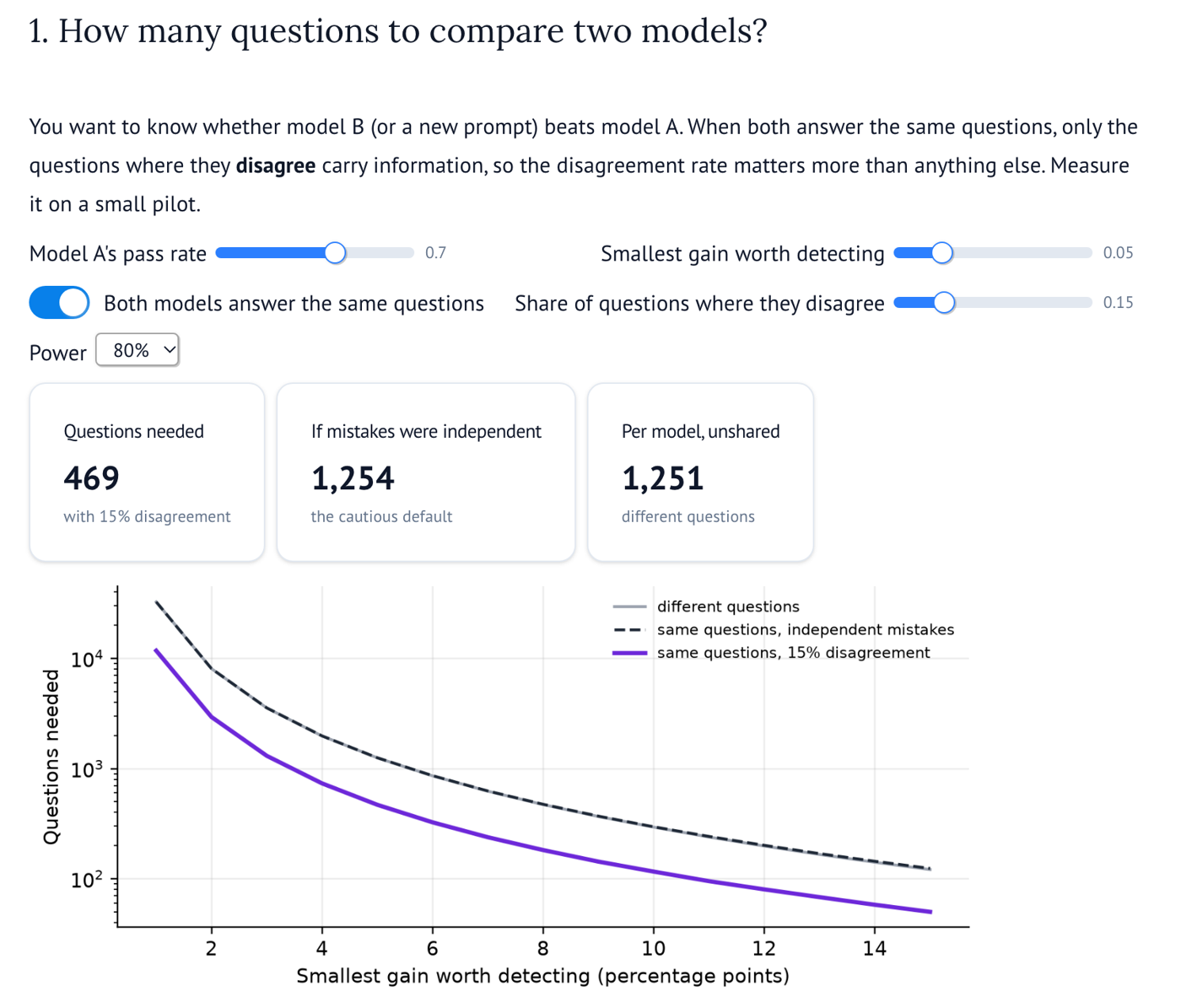
Comparing a 70% model with a 75% model, at the usual 80% power:
| Setup | Questions needed |
|---|---|
| Each model on its own set of questions | 1,251 per model |
| Same questions, models make mistakes independently | 1,254 |
| Same questions, models disagree on 15% of them | 469 |
When both models answer the same questions, only the questions where they disagree tell you which is better. Models often get the same questions right and the same ones wrong, so they usually disagree far less than chance would suggest, and you need far fewer questions. But only if you measure the disagreement rate. Run a small pilot, count the questions where exactly one model is right, and plan with that number.
In the browser: ai-with-md.github.io/evalsize. Move the sliders, nothing to install.
In Python:
pip install evalsizeNo dependencies beyond the standard library. Python 3.9 or newer.
import evalsize as es

es.examples_to_compare(baseline=0.70, improvement=0.05, disagreement=0.15)
# 469

es.smallest_detectable_improvement(n=300, baseline=0.70, disagreement=0.15)
# 0.062  -> with 300 questions you can reliably detect about 6 points, not less
Leave out disagreement and evalsize assumes the models make mistakes independently, which is the cautious answer. Pass paired=False if the two models answer different questions.
es.pass_rate_interval(passes=160, n=200)
# Pass rate 80.0% (160 of 200). 95% confidence interval: 73.9% to 85.0%.

es.examples_for_margin(margin=0.03, pass_rate=0.80)
# 682 questions for plus or minus 3 pointsresult = es.compare_results(a_passed, b_passed) # two lists of True/False, same question order
print(result)
# B minus A: +5.3% over 300 shared questions (95% interval +1.2% to +9.4%, p = 0.0166).
# B looks better than A. The models disagreed on 40 questions.Or from counts: es.compare_counts(n=300, only_a_right=12, only_b_right=28).
If a model gives different answers on different runs, rerunning each question averages out that randomness. It cannot fix the other source of noise: which questions you picked.
share = es.question_share(pilot_runs)  # one row per question, one 0/1 per run
es.effective_examples(n_questions=200, runs_per_question=5, question_share=share)
# with share 0.6: worth 294 single-run questions, and no number of reruns can beat 333
A deterministic model has a question share of 1, and reruns add nothing. Per API call, adding questions always buys more precision than adding runs, so reruns make most sense when you have run out of good questions.
A judge that passes some bad answers or fails some good ones does not just add noise. It moves the score in one direction. Label a random sample by hand, measure the judge, and correct:
check = es.judge_agreement(human_labels, judge_labels)
print(check)
# The judge agreed with humans on 87.5% of 200 labels. It passed 95.0% of answers
# humans passed and failed 70.0% of answers humans failed.

es.correct_judge_rate(judge_rate=0.82, n_judged=1000,
                      sensitivity=check.sensitivity, specificity=check.specificity,
                      human_passes=check.human_passes, human_fails=check.human_fails)
# The judge says 82.0%. Corrected for the judge's mistakes: 80.0% (95% interval 73.2% to 86.8%).

es.labels_to_check_judge(margin=0.05, pass_rate=0.80)
# how many answers to label by hand before you startTest four new prompts that are all exactly as good as the current one, and there is up to a 19% chance that one of them looks significantly better by luck. Pick it and you ship a change that does nothing. evalsize shares the 5% false alarm rate across all the comparisons, and flags the candidates that only looked good because you tried several.
es.examples_to_compare(baseline=0.70, improvement=0.05, disagreement=0.15, comparisons=4)
# 667 questions to test 4 new prompts, instead of 469 for one

result = es.compare_many(
    {"current": current, "short": short, "step_by_step": step, "persona": persona, "few_shot": few_shot},
    baseline="current",
)
print(result)
# 4 candidates against 'current' (68.7%) on 300 shared questions, corrected for 4 comparisons.
#   short         vs current   +0.0%  (-3.8% to +3.8%)  adjusted p = 1  could be noise
#   step_by_step  vs current   +7.7%  (+3.7% to +11.5%)  adjusted p = 9.54e-07  reliably better
#   persona       vs current   +3.3%  (-0.1% to +6.7%)  adjusted p = 0.0638  could be noise
#   few_shot      vs current   -0.7%  (-4.3% to +2.9%)  adjusted p = 1  could be noise
# Reliably better than 'current': step_by_step.
# Without the correction, persona would have looked significant at 0.05. Treat it as a possible lucky win.
Leave out baseline to compare every pair. Or from a CSV with one column per prompt and one row per question (try examples/four_prompts.csv, simulated results where only step_by_step is really better):
evalsize many results.csv --baseline currentevalsize compare --baseline 0.7 --improvement 0.05 --disagreement 0.15
evalsize detect --baseline 0.7 --n 300 --disagreement 0.15
evalsize margin --rate 0.8 --margin 0.03
evalsize diff --n 300 --only-a 12 --only-b 28
evalsize reruns --n 200 --share 0.6
evalsize judge --judge-rate 0.82 --sensitivity 0.95 --specificity 0.7 --human-passes 140 --human-fails 60
evalsize compare --baseline 0.7 --improvement 0.05 --disagreement 0.15 --comparisons 4
evalsize many results.csv --baseline currentFormulas are easy to get subtly wrong, so every one is tested against simulation. The test suite runs thousands of fake evals with known true pass rates and checks that the promises hold: the sample sizes deliver their stated power, the intervals cover the truth 95% of the time, the false alarm rate stays at 5% (also when testing several prompts at once), and the rerun and judge corrections match what the simulations show. See tests/test_simulation.py.
- evalstats analyzes results after you run an eval, with many tests and judge-bias corrections. evalsize is mostly about planning before you run: how many questions, how many runs, how many human labels. They work well together.
- General power calculators (statsmodels, G*Power, online calculators) handle two separate groups well, but rarely the paired case with a disagreement rate, which is how most LLM evals are run, and they say nothing about reruns or imperfect judges.
| Question | Method |
|---|---|
| Precision of one score | Wilson score interval |
| Comparing two models, planning | McNemar sample size formula (Connor, 1987); two-proportion formula when unpaired |
| Comparing two models, analysis | Exact McNemar test, Agresti and Min (2005) interval for the paired difference |
| Reruns | Intraclass correlation (one-way analysis of variance estimator) and the design effect |
| Imperfect judges | Rogan and Gladen (1978) estimator with a delta method interval that includes the uncertainty in the judge's measured error rates |
| Several prompts at once | Bonferroni split of the false alarm rate for planning; Holm adjusted p-values and Bonferroni adjusted intervals for analysis |
Everything here is for pass/fail scores, which is how most evals are reported. Planning for scores on a scale (1 to 5, or 0 to 1) is a likely next step.
Small, free tools for building and checking AI systems:
- evalnoise: where the noise in an eval score comes from (questions, judges, prompt wordings, reruns), and where to spend the next API calls.
- rolloutwatch: whether a prompt or model change made quality worse, checking as often as you like without false alarms.
- sturdytools: retries, timeouts, rate limits and circuit breakers for the tools an AI agent calls.
- costplan: what an AI agent will cost and what budget cap to set, from a handful of pilot runs.
python -m venv .venv
source .venv/bin/activate
pip install -e ".[dev]"
pytest
The calculator is a marimo notebook in app/calculator.py. To run it locally: pip install marimo matplotlib, then marimo run app/calculator.py. It is published to GitHub Pages as a WebAssembly app on every push to main.
MIT