

Web-based White Matter Tractography and Surfaces Viewer for brainlife.io.
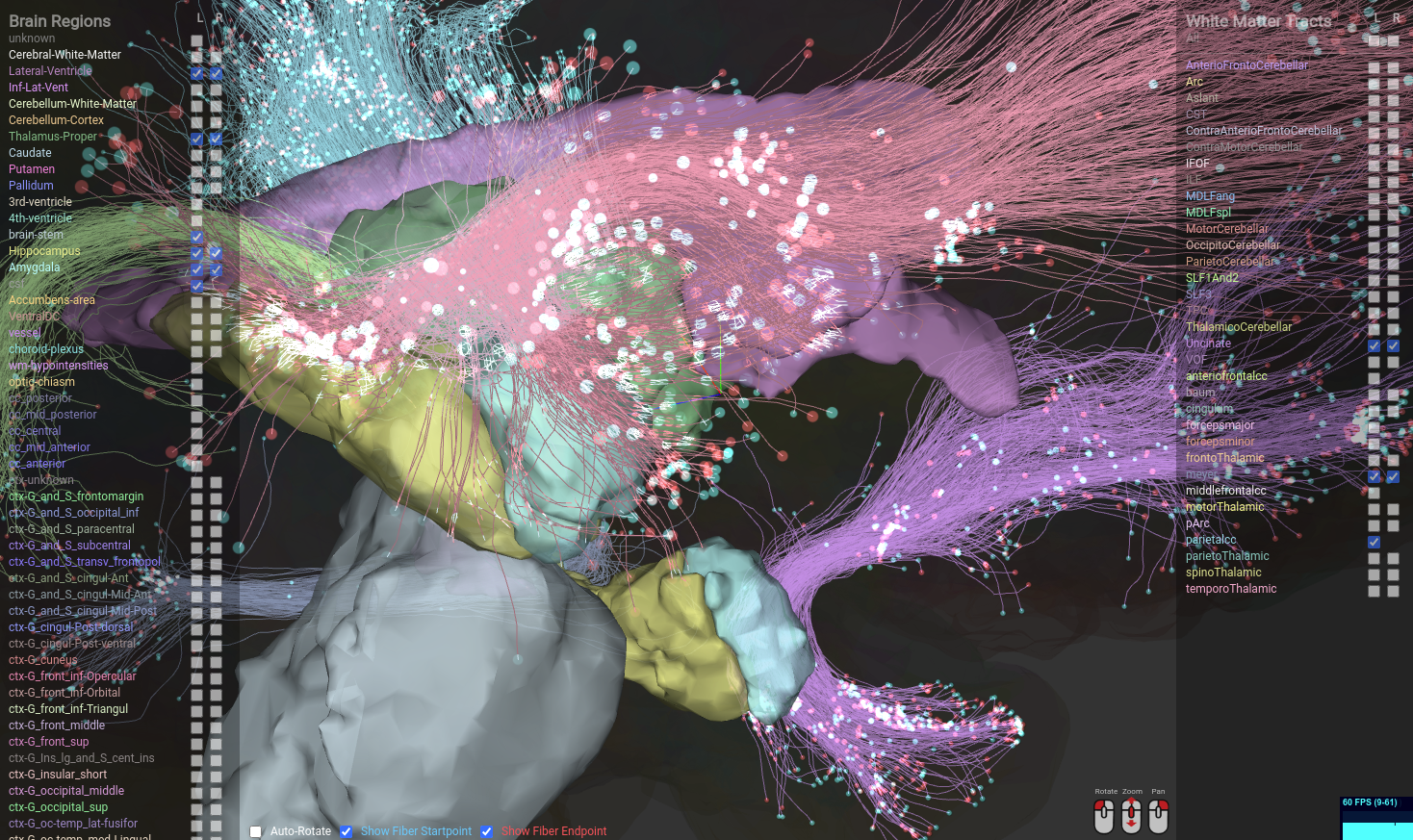
The white matter of the human brain can be found in subcortical areas of the brain, and it allows distal parts of the brain to communicate and transmit information. As the role of white matter is to interact with various parts of the brain, it is important to visualize white matter together with both cortical and subcortical areas that each tracts interact with. Although it is possible to visualize white-matter tracts together with segmented brain surfaces using existing tools, they often require advanced expertise in data preprocessing and visualization techniques to correctly visualize them. Combined with brainlife.io; an easy-to-use neuroimaging platform, Tractview is a simple yet effective web-based visualizer for white matter tractography and brain surfaces. It enables researchers to quickly gain preliminary insights on the data being processed on bralinlife.io before a more thorough analysis can be performed.
This App is used to visualize brainlife's neuro/wmc datatype (white matter tractography) object. The easiest way to run it is to open it on brainlife.io. If you'd like to run it locally (maybe for development purpose), you can run the following command inside the git cloned repo.
Dependencies
- nodejs (>14.17.1)
- npm (>6.14.13)
- tsc (>4.4.2)
Installation
git clone https://github.com/brain-life/ui-tractview.git
cd ui-tractview && npm install
Running..
$ npm run dev

> tractview@0.0.0 dev /home/hayashis/syncthing/git/tractview
> vite


  vite v2.5.7 dev server running at:

  > Local: http://localhost:3000/
  > Network: use `--host` to expose

  ready in 256ms.
You can then click on the localhost host link to launch a web browser and tractview should launch using brainlife.io's demo data.
To visualize your own data in stead of the demo data, you will have to prepare neuro/wmc data structure according to the specification. You can download a few sample datasets from brainlife's sample datasets project.
The neuro/wmc basically contains 2 directories (tracts and surfaces) that are used by tractview. classification.mat contains the actual classification of the tracts but it is not used by this visualizer.
How to organize data inside tracts and surfaces is beyond the scope of this README, but please feel free to contact us if you would like to have an assistance.
Create a directory named testdata under ./public directory of the repo, and add the following <script> content in the ./index.html right above <script src="/src/main.ts"></script>
  <script>
    window.config = {
        tracts: [
            {
                name: "forcepsMinor",
                color: [ 0.8147236864, 0.2550951155, 0.004634224134 ],
                url: "testdata/tracts/1.json"
            },
            {
                name: "forcepsMajor",
                color: [ 0.9057919371, 0.5059570517, 0.7749104647 ],
                url: "testdata/tracts/2.json"
            }
        ],
        surfaces: [
            {
                label: "2",
                color: { "g": 245, "r": 245, "b": 245 },
                name: "Left-Cerebral-White-Matter",
                url: "testdata/surfaces/2.Left-Cerebral-White-Matter.vtk",
            },
            {
                label: "41",
                color: { "g": 245, "r": 245, "b": 245 },
                name: "Right-Cerebral-White-Matter",
                url: "testdata/surfaces/41.Right-Cerebral-White-Matter.vtk",
            },
            {
                label: "4",
                color: { "g": 18, "r": 120, "b": 134 },
                name: "Left-Lateral-Ventricle",
                url: "testdata/surfaces/4.Left-Lateral-Ventricle.vtk",
            },
            {
                label: "43",
                color: { "g": 18, "r": 120, "b": 134 },
                name: "Right-Lateral-Ventricle",
                url: "testdata/surfaces/43.Right-Lateral-Ventricle.vtk",
            },
        ]
    };
  </script>
You will need to enumerate all tracts / surfaces that are stored inside the tracts and surfaces directories.
brainlife.io is publicly funded and for the sustainability of the project it is helpful to Acknowledge the use of the platform. We kindly ask that you acknowledge the funding below in your publications and code reusing this code.





We kindly ask that you cite the following articles when publishing papers or code using this code.
- Avesani, P., McPherson, B., Hayashi, S. et al. The open diffusion data derivatives, brain data upcycling via integrated publishing of derivatives and reproducible open cloud services. Sci Data 6, 69 (2019). https://doi.org/10.1038/s41597-019-0073-y
This project was initialized using vite.
npm init vite-app tractview
A bundle JSON contains coords, an array of streamlines. TractView accepts both
[[x1, x2, ...], [y1, y2, ...], [z1, z2, ...]] (axes) and
[[x1, y1, z1], [x2, y2, z2], ...] (points) for each streamline, plus legacy
MATLAB singleton wrappers. Each streamline must contain at least two finite XYZ
points. Invalid bundles display an error instead of leaving loading unfinished.
A 3-by-3 streamline is ambiguous. The viewer follows the other streamlines in the
bundle when possible; otherwise it retains the legacy axes interpretation.
Exporters can set "coordinateLayout": "points" or "coordinateLayout": "axes"
on the bundle JSON or its manifest entry to resolve this explicitly.
The warehouse viewer uses tracts/tracts.json when present. If it is missing,
it discovers JSON bundles through the dataset, publication, or staged-task file
listing. It derives display names and colors from filenames; an explicit manifest
is still preferred when descriptive names or specific colors are required.
Surfaces remain optional. No stored dataset is modified by this fallback.
Run the geometry regression tests with Node 18+:
node --test test/tract-geometry.test.cjsDeployment requires both the warehouse UI bundle and this viewer's dist/.
Deploy TractView first, then the warehouse UI, so discovered point-layout bundles
are not sent to an older geometry parser.