
This library enables you to write unit tests which test the layout of a view in multiple configurations. It tests the view with different data combinations and different view sizes. The library works in both Objective-C and Swift.
To learn how to use this library, there is a LinkedIn Learning course you can access completely for free authored by Kyle Sherman. You can access it here. It will teach you how to use LayoutTest and all of its features by video tutorial.
When creating views, apps often have conditional logic which depends on the data used to setup the view. LayoutTest provides an easy way to define a data spec (a dictionary) which is then used to generate many different combinations of data. The library then uses this data to layout your view multiple times. For example, this is a small portion of the tests ran in our sample app:
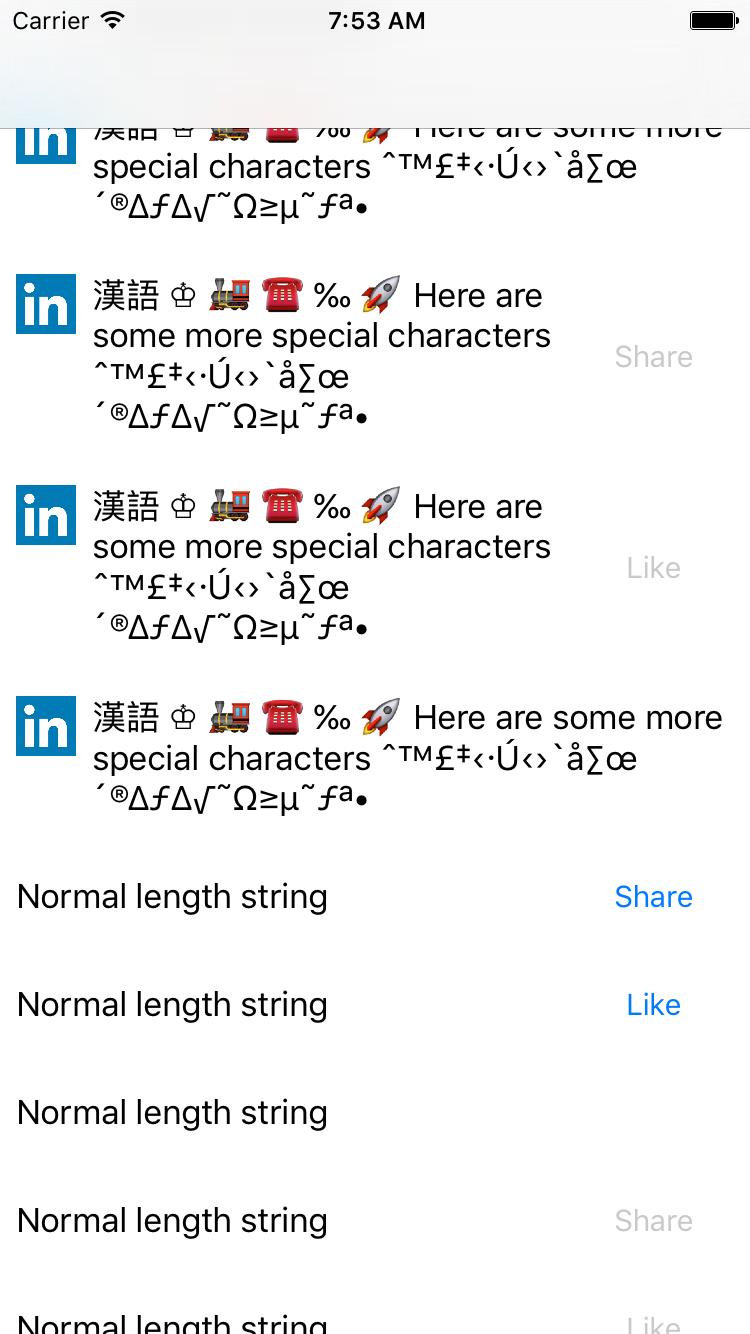
In just one test, your view will be laid out multiple times with different data. You can then run test assertions on these views to verify that the layout and view content is correct. Also, the library will run a few tests automatically such as checking for Autolayout errors, missing accessibility, and overlapping views. Finally, the library makes it easy to test each view with different sizes so you can verify the view will work on different devices.
To get started, you should take a look at the docs:
https://linkedin.github.io/LayoutTest-iOS
In Xcode, add https://github.com/linkedin/LayoutTest-iOS as a package dependency
and link the LayoutTest product to your unit test target only. Use
import LayoutTest in Swift tests.
The LayoutTestBase product provides the helpers without an XCTest dependency.
Use import LayoutTestBase for its Swift helpers, just as with CocoaPods.
Both products preserve the CocoaPods Swift API, including module-qualified names
such as LayoutTestBase.ViewProvider and LayoutTestBase.ViewSize.
Objective-C imports retain the LayoutTest/ and LayoutTestBase/ header paths,
including LayoutTest.h, LayoutTestBase.h, and individual public headers.
For CocoaPods-generated LayoutTest-umbrella.h and LayoutTestBase-umbrella.h
imports, use LayoutTest.h and LayoutTestBase.h, respectively.
The underlying Clang modules are named LayoutTestObjC and LayoutTestBaseObjC
to avoid collisions with the Swift overlays. Public headers are exposed through
relative symlinks and forwarding headers in each target's include/ directory;
explicit module maps keep these compatibility paths modular. Headers under
Private remain implementation-only.
Add to your unit test target:
pod 'LayoutTest'
or
pod 'LayoutTest/Swift'
Open SampleApp/SampleApp.xcodeproj to run the sample apps. The project uses the
local Swift package at the repository root; no pod install is needed.
Select SampleApp to run the app or its layout tests, or CatalogSample to
browse the view catalog. Only the test target links the LayoutTest product;
the catalog app links LayoutTestBase.
Both apps use a single-window scene lifecycle on iOS 13 and later, with an
application-delegate window fallback on iOS 12.
A simple test would look something like this. Check the docs for more detailed information and examples.
Objective-C:
@interface SampleTableViewCellLayoutTests : LYTLayoutTestCase
@end

@implementation SampleTableViewCellLayoutTests
- (void)testSampleTableViewCellLayout {
  [self runLayoutTestsWithViewProvider:[SampleTableViewCell class]
                            validation:^(UIView * view, NSDictionary * data, id context) {
    // Add your custom tests here.
  }];
}
@end

@implementation SampleTableViewCell (LayoutTesting)
  + (NSDictionary *)dataSpecForTest {
    return @{
      @"text": [[LYTStringValues alloc] init],
      @"showButton": [[LYTBoolValues alloc] init]
    }
  }
  + (UIView *)viewForData:(NSDictionary *)data
                reuseView:(nullable UIView *)reuseView
                     size:(nullable LYTViewSize *)size
                  context:(id _Nullable * _Nullable)context {
    SampleTableViewCell *view = (SampleTableViewCell *)reuseView ?: [SampleTableViewCell viewFromNib];
    [view setupWithJSON:data];
    return view;
  }
@end
Swift:
class SampleTableViewCellLayoutTests {
  func testSampleTableViewCell() {
    runLayoutTests() { (view: SampleTableViewCell, data: [NSObject: AnyObject], context: Any?) in
      // Add your custom tests here.
    }
  }
}

extension SampleTableViewCell: LYTViewProvider {
  class func dataSpecForTest() -> [NSObject: AnyObject] {
    return [
      "text": LYTStringValues(),
      "showButton": LYTBoolValues()
    ]
  }
  class func viewForData(data: [NSObject: AnyObject],
                    reuseView: UIView?,
                         size: LYTViewSize?,
                      context: AutoreleasingUnsafeMutablePointer<AnyObject?>) -> UIView {
    let cell = reuseView as? SampleTableViewCell ?? SampleTableViewCell.loadFromNib()
    cell.setupWithDictionary(data)
    return cell
  }
}