Repository navigation
Conversation


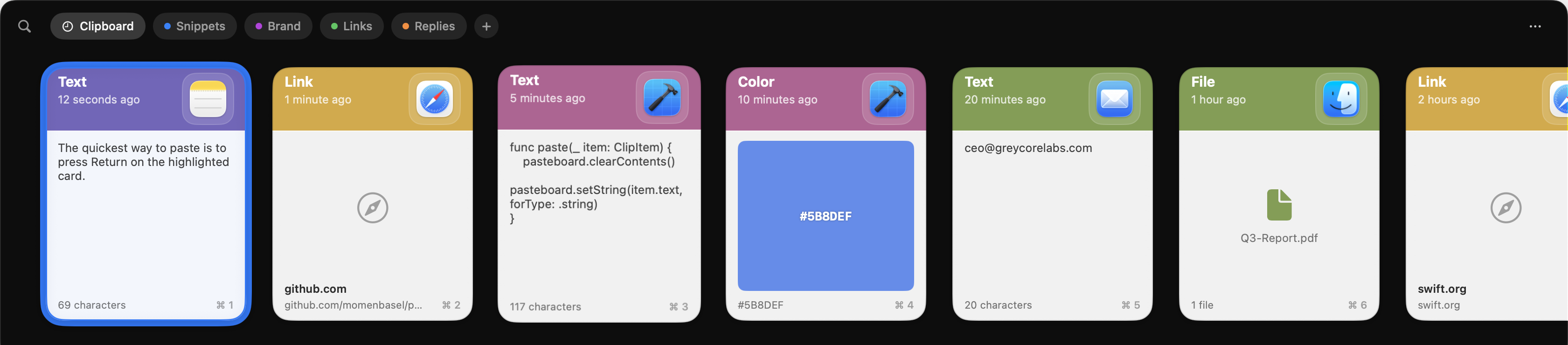
Cards spend their space on chrome instead of on the clip. The header
is a 68pt band with a small icon boxed in a tile, and an image clip -
the one kind of card you identify purely by looking - is squeezed into
whatever the padding leaves behind.

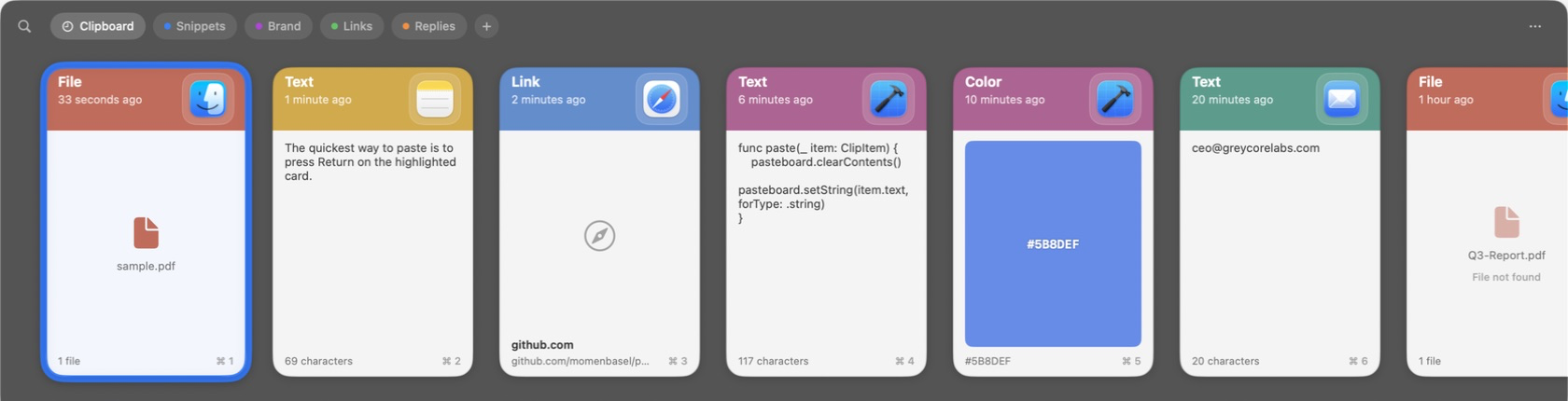
Behind the new "Paste-style clip cards" toggle, the header shrinks to
50pt and the source app's icon is scaled past the card's top-right
corner, cropped by the card's own rounded rectangle so it frames the
corner rather than sitting inside a tile. The header is sized around
the icon rather than the icon blown up to fill the header, because
scaling artwork past its natural size is what makes it look soft. The
icon is drawn from artwork trimmed to its opaque bounds: macOS app
icons carry a transparent margin about 10% wide, so aligning the raw
image to the corner would leave a gap the size of that padding.

Image clips - and file clips that point at an image, which is how a
copied screenshot actually arrives - now run edge to edge, over a
transparency checkerboard so a cut-out is distinguishable from white.
The card body's padding moved onto the content and footer so the image
can reach the card edges while the footer keeps its inset. Whether a
file clip is an image is decided from its path extension, never by
opening it: that runs on every render.

File clips with no preview get the same treatment. The 32pt generic
"doc.fill" glyph becomes the file's real Finder icon at 104pt, because
that badge is the whole identity of a document you can't see into; a
clip with no usable file URL still falls back to the glyph. A clip of
several files fans out the real icons of its first three, first on
top, which says both what kind of files these are and that there is
more than one - something a single page icon cannot. Its header reads
"5 files" rather than the generic type label, since a multi-file clip
is one clip of many files and naming only the first hid the rest.

A file that does have a preview shows it. Every PDF, model, and
document otherwise looked alike, so a single non-image file now
renders the system's Quick Look thumbnail of its real contents,
generated once per path and cached - along with the paths the system
has no preview for, so a file it cannot render is not asked about
again on the next card that shows it. Generation runs in a task keyed
on the clip rather than on the render pass, so scrolling the strip
starts no work of its own.

A clip whose file has moved or been deleted dims its icon and says
"File not found", and draws that icon from the file's type rather than
its path: asking the workspace about a path that no longer exists
hands back a blank page, which reads as a failed render. This is the
one thing here that is not behind the toggle. It reports a fact about
the clip rather than restyling it, and a clip that can no longer paste
anything should say so in either layout.

The toggle defaults on; turning it off restores the tile header, the
inset image, and the generic file glyph exactly as before - save for
that missing-file caption, which is information rather than style.


|
Closing in favour of 4b1d814 on main (through #104), which keeps the full-bleed treatment, the checkerboard view and the "5 files" header from this PR with credit in the commit body, and fixes #102. What I did not take: image clips still went through store.loadImage, so the full stored PNG was decoded with NSImage(contentsOf:) on the main thread inside the card's body on every render, which is the part a preview feature most needs to avoid; the trimmed-icon cache was an unbounded static dictionary; and the whole thing sat behind a "paste-style cards" toggle, which left the old padded thumbnail as a second code path to keep working. On main the previews are the behavior rather than an option: ClipPreviewProvider decodes a downsampled thumbnail off the main actor with CGImageSourceCreateThumbnailAtIndex, asks Quick Look for image files, resolves the Finder icon for other files, and keeps everything in an NSCache bounded by count and byte cost. The "File not found" caption is suppressed in the sandboxed App Store build, where a copied file's access does not survive a relaunch and stat fails for files that are still there. Thanks @alvst. |
2 participants


Cards currently spend their space on chrome rather than on the clip: a 68pt header with a small icon in a tile, and an image — the one card type you identify purely by looking — squeezed into whatever the padding leaves. This adds an alternative card style behind a setting.
What changed
doc.fillglyph; a multi-file clip fans out the real icons of its first three, first on top. A clip with no usable file URL still falls back to the glyph.Screenshots
Before:
After:
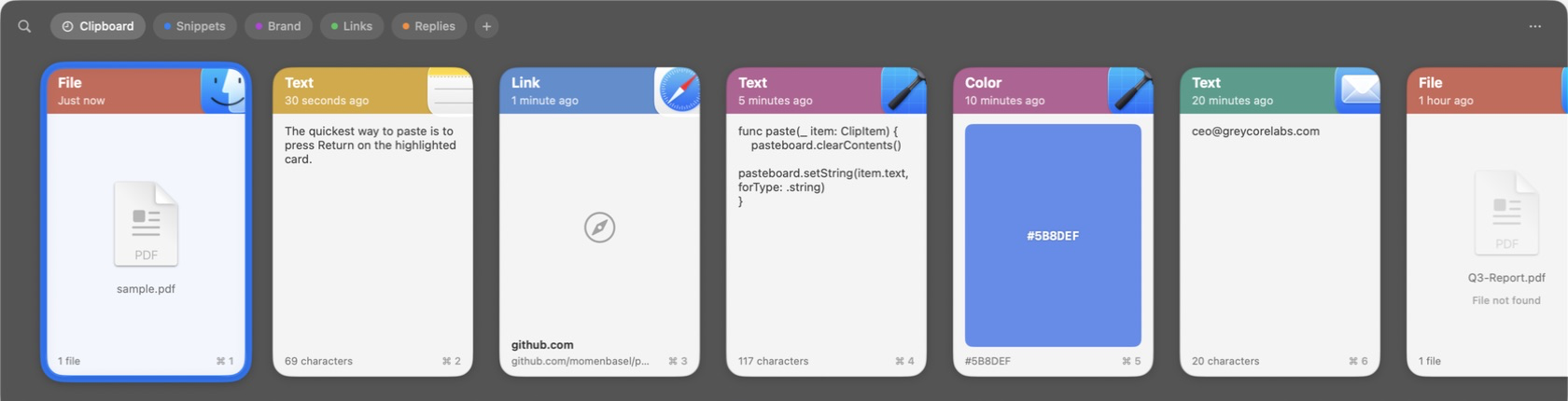
Notes for review
alvie/pr-25-clip-card-metadata; the two deliberately use differently-named helpers, so either can merge first.This feature should be bundled into v2.
Part of #80.