
A safe Python REPL embedded in Lovelace — with built-in AI analyst, ECharts visualisations, and deep state exploration. All running entirely in your browser.


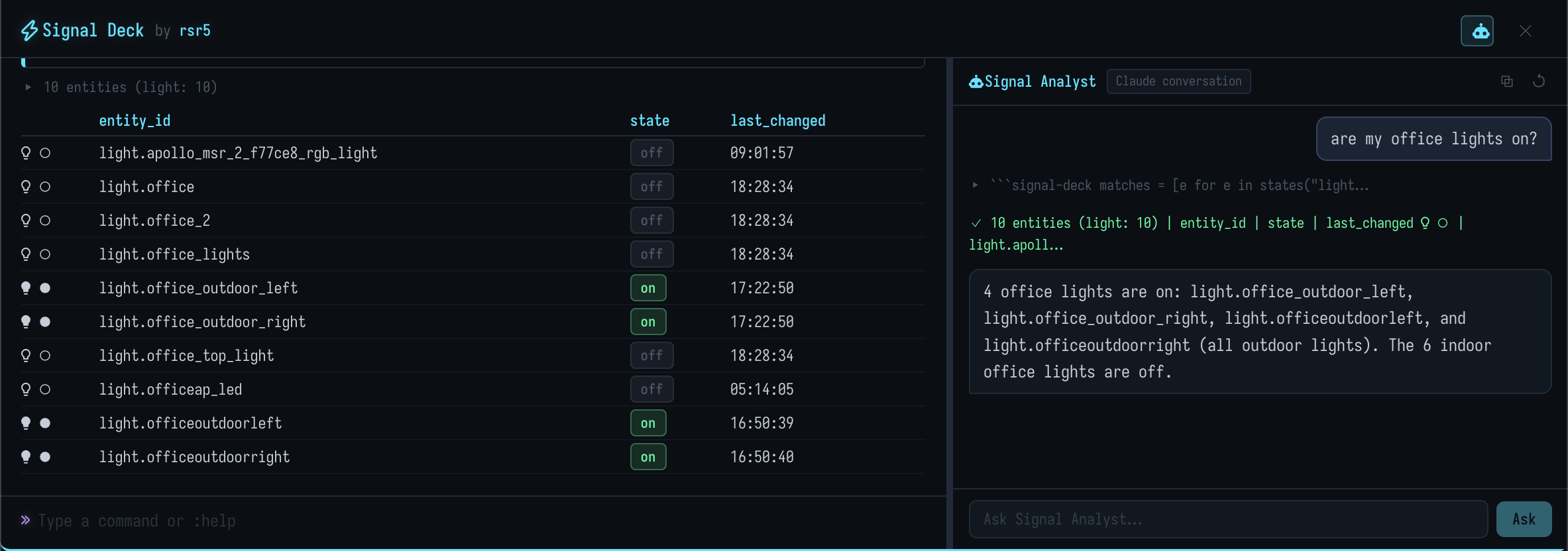
Signal Deck is a custom Lovelace card that gives you a sandboxed Python shell right inside Home Assistant. It's built for power users who want to explore entity state, debug automations, visualise history data, and ask an AI analyst questions about their home — all without leaving the dashboard.
Built on Monty (Pydantic's Python-in-WASM runtime) and a custom Rust shell engine compiled to WebAssembly.
|
🐍 Python REPL Full Python interpreter running in WebAssembly. No backend, no server, no add-on. 🤖 AI Signal Analyst Built-in AI assistant that writes and executes Python against your live HA state. Powered by HA Conversation — works with Claude, Ollama, and local models. 📊 ECharts Visualisations Line, bar, pie, and time-series charts with one function call. Auto-themed to match Signal Deck's dark aesthetic. |
🔍 Deep State Explorer Magic commands to search, compare, and inspect entities — attributes, history, diffs, traces, logbooks, calendar events, and more. 🔒 Safe by Default Read-only state access. Service calls require explicit confirmation. No filesystem or network access. Everything sandboxed in WASM. 🖥️ Overlay Mode A Quake-style drop-down console that stays hidden until you need it. Toggle with backtick. 🏷️ Semantic Layer Persistent annotations, notes, and tags on entities that survive between sessions. Build institutional knowledge the AI analyst can reference. |
- Open HACS in Home Assistant
- Click ⋮ → Custom repositories
- Add
https://github.com/rsr5/signal-deck→ Category: Lovelace - Find Signal Deck and install
- Restart Home Assistant
- Download
signal-deck.jsfrom the latest release - Copy to
/config/www/signal-deck/signal-deck.js - Add the resource in Settings → Dashboards → Resources:
url: /local/signal-deck/signal-deck.js
type: moduleAdd Signal Deck to any Lovelace dashboard:
type: custom:signal-deck
title: Signal Deck
Then try these commands:
# Check entity state
state("sensor.living_room_temperature")

# List all lights
states("light")

# See 12 hours of history
history("sensor.power_consumption", 12)

# Search for entities
%find *occupied*

# Ask the AI analyst
%ask why is the kitchen light on?type: custom:signal-deck
title: My Shell # Card title (optional)
height: 600px # Card height (optional)
mode: overlay # "embedded" (default) or "overlay"
overlay_position: top # "top", "bottom", or "full"
overlay_height: 50vh # Height when top/bottom
show_analyst: true # Show AI analyst tab
agent_id: conversation.claude_sonnet # Pin a specific LLM agent| Option | Type | Default | Description |
|---|---|---|---|
title |
string | — | Card title |
height |
string | auto | Card height (CSS value) |
mode |
string | "embedded" |
"embedded" or "overlay" |
overlay_position |
string | "top" |
"top" · "bottom" · "full" |
overlay_height |
string | "50vh" |
Overlay panel height |
show_analyst |
boolean | true |
Show the AI analyst tab |
agent_id |
string | auto | HA Conversation agent ID |
All functions are top-level — no imports needed.
| Function | Description |
|---|---|
state(id) |
Entity state as EntityState dataclass |
states([domain]) |
List states, optionally by domain |
entities(id) |
Entity registry entry (integration, device, platform) |
devices([query]) |
List or search devices |
| Function | Description |
|---|---|
history(id, [hours]) |
Entity history (default 6h) |
statistics(id, [hours], [period]) |
Long-term statistics |
events(id, [hours]) |
Calendar events (default 14 days forward) |
logbook([id], [hours]) |
Logbook entries |
traces([automation_id]) |
Automation/script traces |
error_log() |
HA error log |
check_config() |
Validate HA configuration |
| Function | Description |
|---|---|
room(name) |
All entities in an area/room |
rooms() |
List all areas/rooms |
services([domain]) |
List available services |
call_service(d, s, {}) |
Call a HA service (requires confirmation) |
| Function | Description |
|---|---|
show(value) |
Pretty-print any value |
now() |
Current date/time |
ago(spec) |
Relative time — ago("6h"), ago("2d") |
template(tpl) |
Render a Jinja2 template |
| Function | Description |
|---|---|
plot_line(labels, values, [title]) |
Line chart |
plot_bar(labels, values, [title]) |
Bar chart |
plot_pie(data, [title]) |
Pie chart ({"name": value}) |
plot_series(points, [title]) |
XY / time-series chart |
Multi-series: pass {"Series A": [...], "Series B": [...]} as values.
Time axes auto-detected from epoch-ms x values.
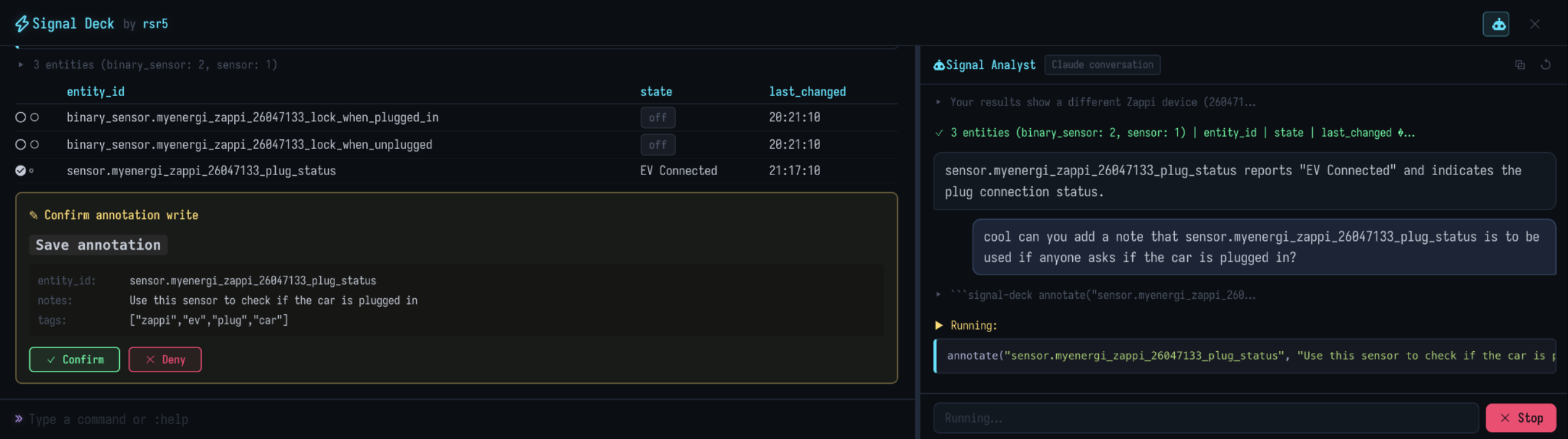
Persistent notes, tags, and observations that survive between sessions. Stored in HA's frontend/user_data — no external database needed. Annotation writes require user confirmation.
| Function | Description |
|---|---|
annotate(id, note) |
Save a note on an entity (confirmation required) |
annotate(id, note, [tags]) |
Save a note + tags (confirmation required) |
annotations() |
Read all entity annotations |
annotations(id) |
Read annotation for one entity |
note(text) |
Save a global observation (confirmation required) |
notes() |
Read all global notes |
tags() |
List all tags in use |
tags(name) |
Find entities with a tag |
tags(id, [tags]) |
Set tags on an entity (confirmation required) |
del_annotation(id) |
Delete an entity's annotation (confirmation required) |
# Annotate an entity
annotate("sensor.boiler_temp", "Cycles every 40 min", ["heating", "cyclic"])

# Read back all annotations
annotations()

# Save a global note
note("Boiler serviced 2026-02-20, new pump fitted")

# Read all global notes
notes()

# Find everything tagged "heating"
tags("heating")
The AI analyst automatically receives all stored annotations as context, so it can reference your observations when answering questions.
| Command | Description |
|---|---|
:help |
Show help reference |
:clear |
Clear output |
%ls [domain] |
List entities |
%get <id> |
Show entity state |
%find <pattern> |
Search entities by glob |
%hist <id> [-h N] |
Show history (last N hours) |
%attrs <id> |
Show all entity attributes |
%diff <id1> <id2> |
Compare two entities |
%bundle <name> |
Run a named bundle |
%fmt <format> |
Set output format (table · json · text) |
%ask <question> |
Ask the AI analyst |
Type entity IDs or domain names directly — Signal Deck resolves them:
sensor.living_room_temperature  # → %get sensor.living_room_temperature
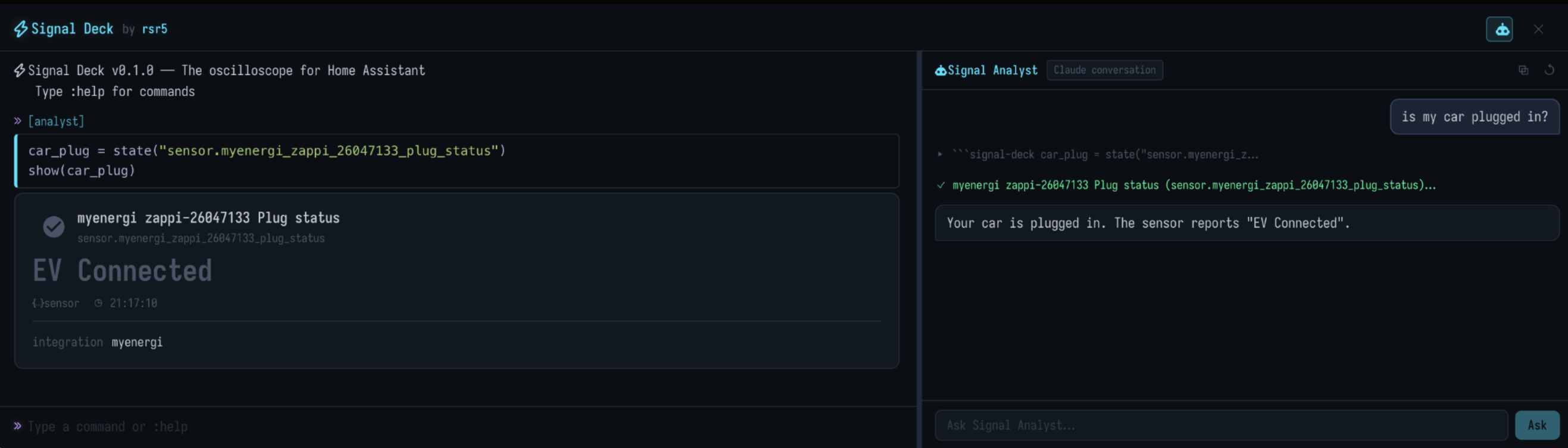
light # → %ls lightThe built-in AI analyst connects to your HA Conversation integration. It writes and executes Python code against your live state in an iterative loop — write code, see results, continue until it can answer.
%ask which rooms are currently occupied?
%ask why did the kitchen light turn on at 3am?
%ask show me power consumption over the last 24 hours
%ask compare indoor and outdoor temperature
%ask chart the agile electricity prices
Works with any HA Conversation agent — Claude, GPT, Ollama, or whatever you have configured.
Signal Deck uses a three-layer architecture with strict boundaries:
┌─────────────────────────────────────────────────────┐
│  TypeScript (Lit Element)                           │
│  Lovelace card · HA WebSocket · UI rendering        │
├─────────────────────────────────────────────────────┤
│  Rust Shell Engine (WASM)                           │
│  REPL · magics · session state · render specs       │
├─────────────────────────────────────────────────────┤
│  Monty Python Runtime (WASM · sandboxed)            │
│  Executes user Python snippets · no direct HA I/O   │
└─────────────────────────────────────────────────────┘
| Layer | Responsibility |
|---|---|
| TypeScript | HA WebSocket bridge, DOM rendering, Lovelace lifecycle, auth |
| Rust (WASM) | Command parsing, magics, session state, output shaping, charts |
| Monty (WASM) | Sandboxed execution of user Python code |
Security: Python runs in WebAssembly — no filesystem, no network, no system access. All HA data fetched via WebSocket by TypeScript. Service calls require explicit user confirmation.
git clone https://github.com/rsr5/signal-deck.git
cd signal-deck
npm install

npm run build:wasm    # Rust → WASM
npm run build:ts      # TypeScript → JS bundle
npm run build # Bothnpm run dev # Rollup dev server on localhost:5050Point HA to http://YOUR_DEV_IP:5050/signal-deck.js as a resource.
cargo test            # Rust tests (170 tests)
npx vitest run        # TypeScript tests (19 tests)
npm run test:all # Bothsignal-deck/
├── crates/shell-engine/ # Rust shell engine → WASM
│ └── src/
│ ├── engine.rs # Core REPL engine + chart builders
│ ├── magic.rs # Magic command parser + help text
│ ├── monty_runtime.rs # Monty Python integration
│ └── render.rs # Render spec types
├── src/
│ ├── signal-deck.ts # Main Lit Element card
│ ├── assistant/ # AI analyst agent loop
│ ├── components/ # Entity card renderers
│ ├── engine/ # WASM bridge
│ ├── host/ # HA WebSocket host functions + semantic store
│ └── types/ # TypeScript types
├── docs/ # Documentation site
├── dist/ # Built card bundle
└── pkg/ # WASM build output
See CONTRIBUTING.md for the full contributor guide and agents.md for architecture rules.
Signal Deck is in early alpha — APIs, commands, and configuration may change between releases. It is not yet battle-tested and should not be relied upon for critical automations.
Signal Deck can interact with your Home Assistant instance, including calling services that control devices. Use at your own risk. The authors are not responsible for any damage, data loss, or unintended actions resulting from its use. See the MIT License for full terms.
MIT © 2025 Robin Ridler
📖 Documentation · 🐛 Report Bug · 💡 Request Feature
Made with 🧡 for the Home Assistant community