
A 3D surf and bunny-hop timer game for Godot 4, built on the GameSpice platform and addon collection. This is highly inspired by classic competitive shooter movement and includes some classic Surf Timer and Bunny Hop maps (WIP) from the genre!

Play on the test server here.
The project and its assets are open source under the MIT license. Only the back-end web infrastructure is not; if you use your own authentication back end instead of GameSpice, you build that part yourself.
Airdrift is part of Zee's Games, a set of open source multiplayer games that share the GameSpice platform and run on live servers. Claude Code wrote it, and the project is MIT licensed. Bug reports are welcome on the issue tracker.
Real gameplay captured on a GPU. Click an image for full size.
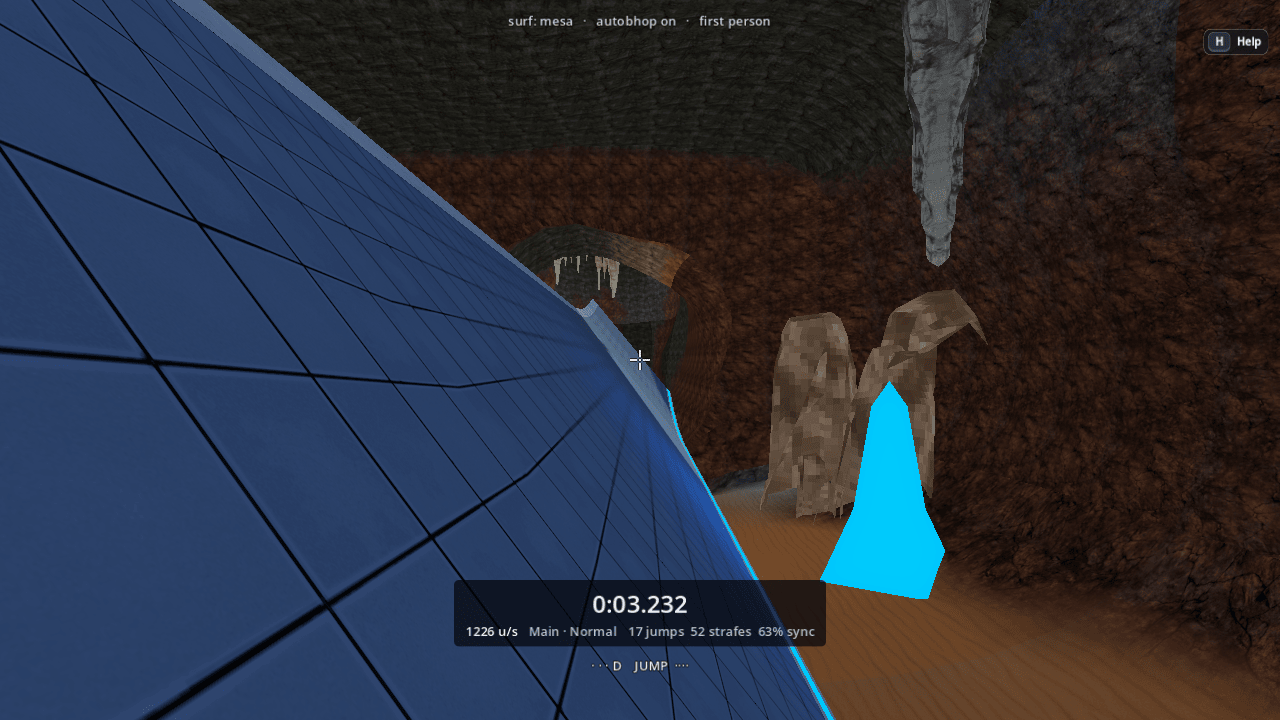 Riding a surf ramp mid-run at 1226 u/s on a converted Source map. |
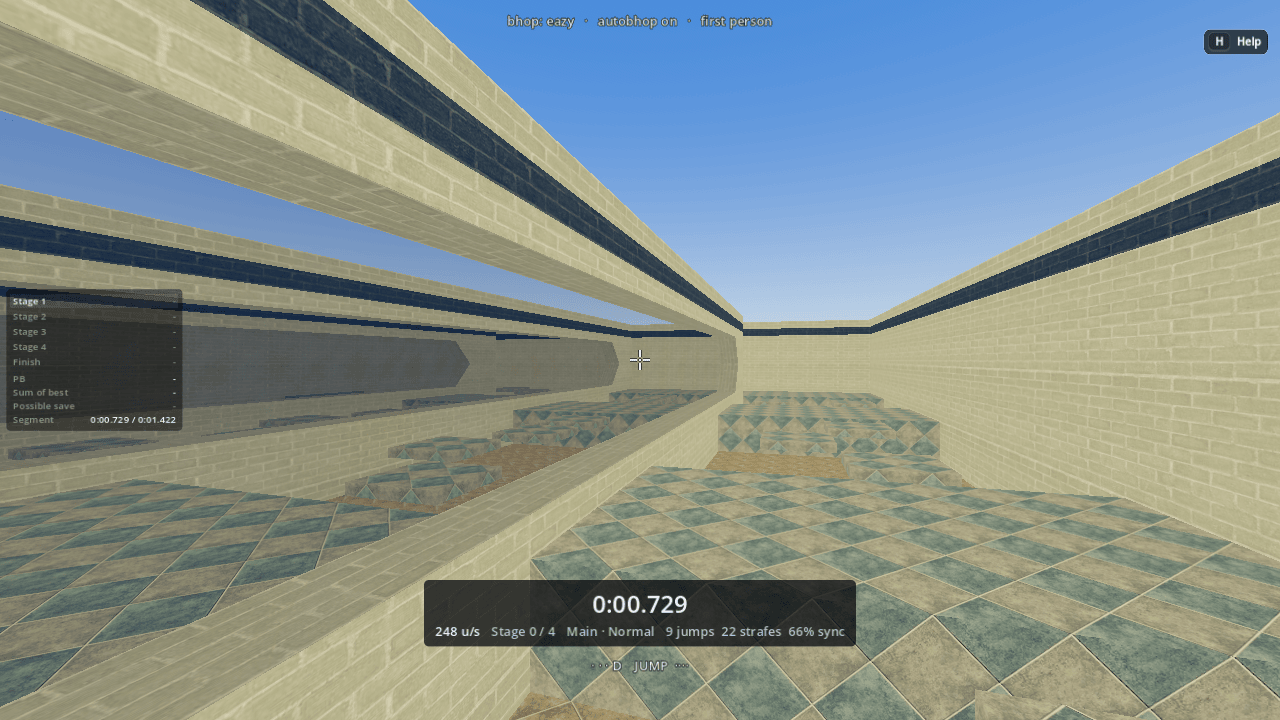 Bunny hopping a flat map, with the timer and strafe sync on screen. |
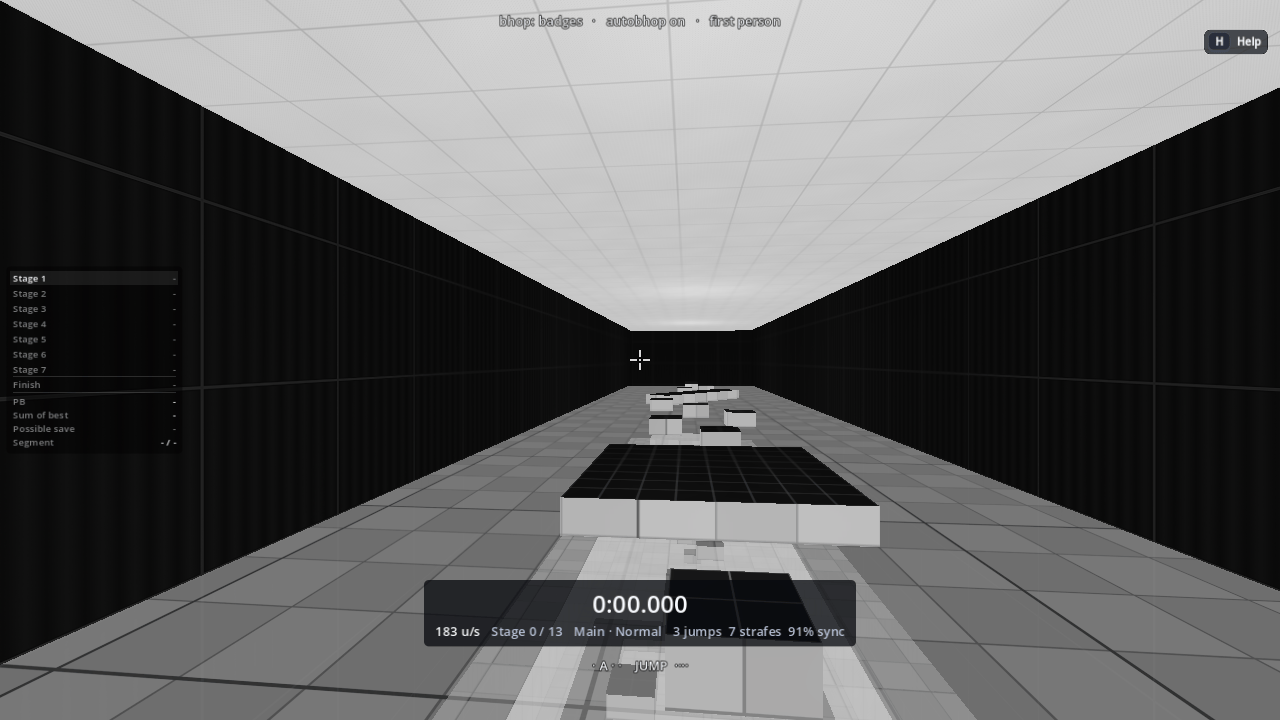 The timer HUD: speed, jumps, strafes and sync percentage. |
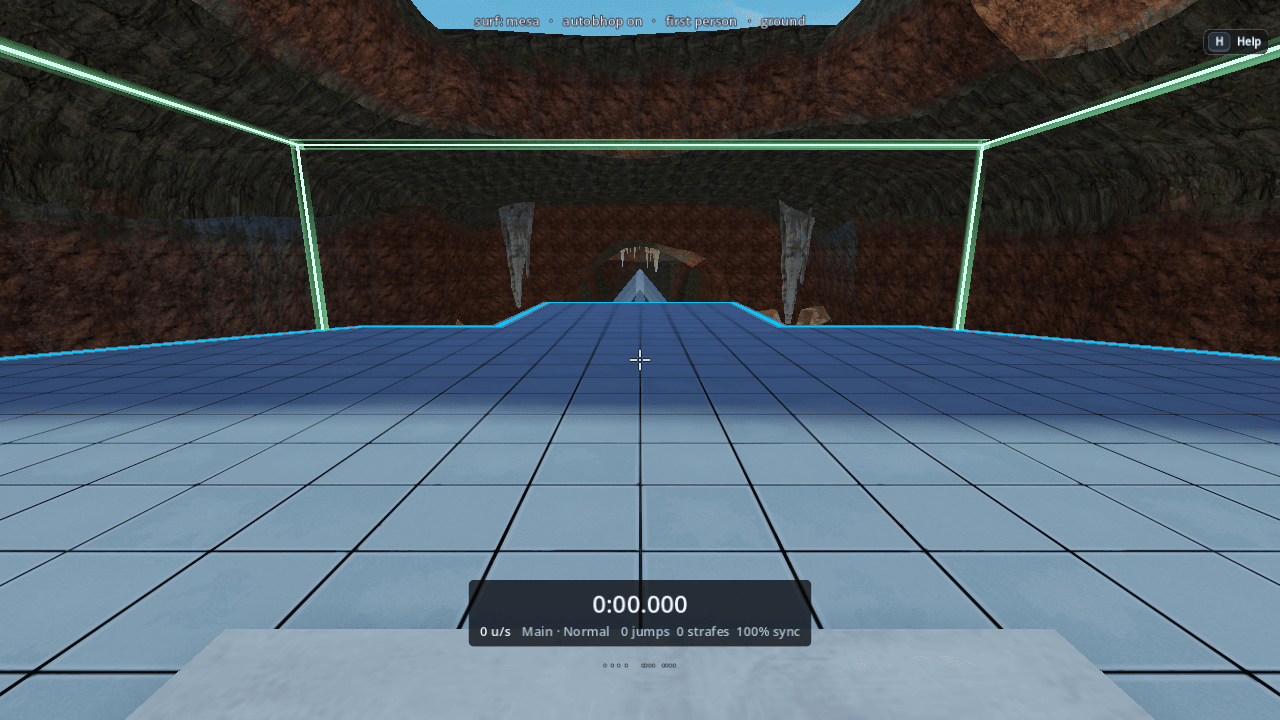 Standing in the start zone before the timer starts. |
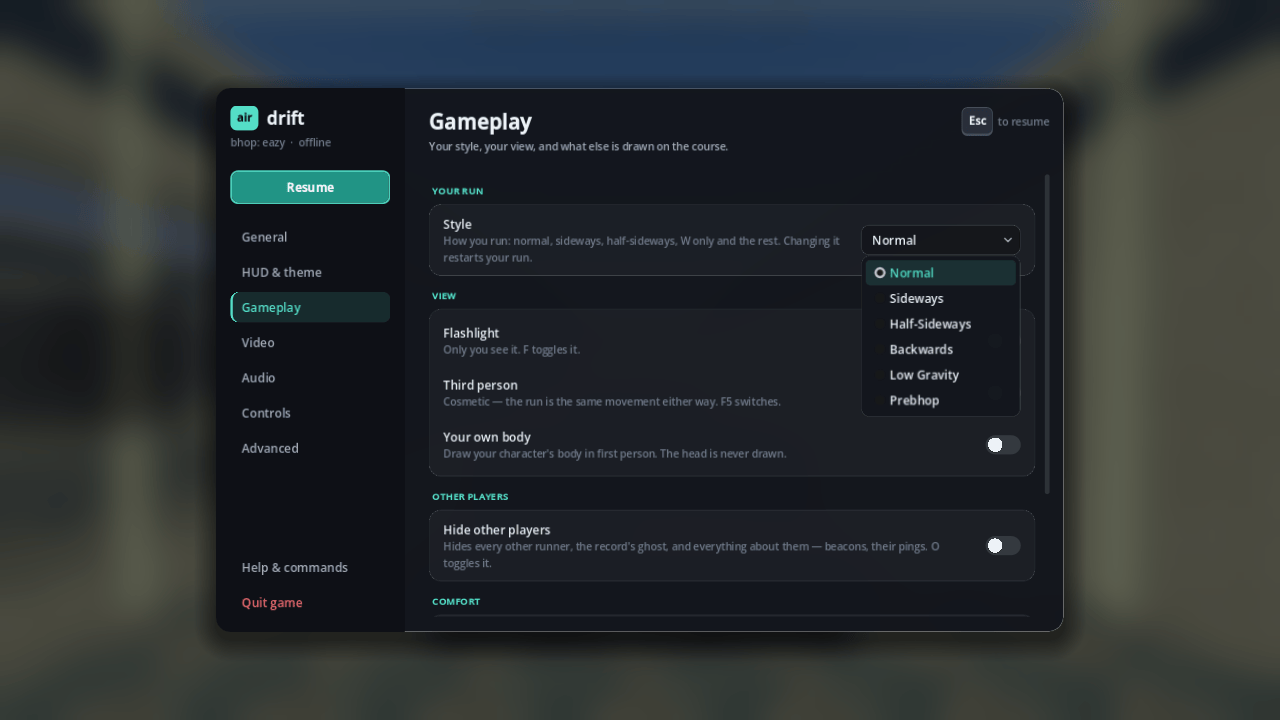 Choosing a style (normal, sideways, low gravity, prebhop and more). |
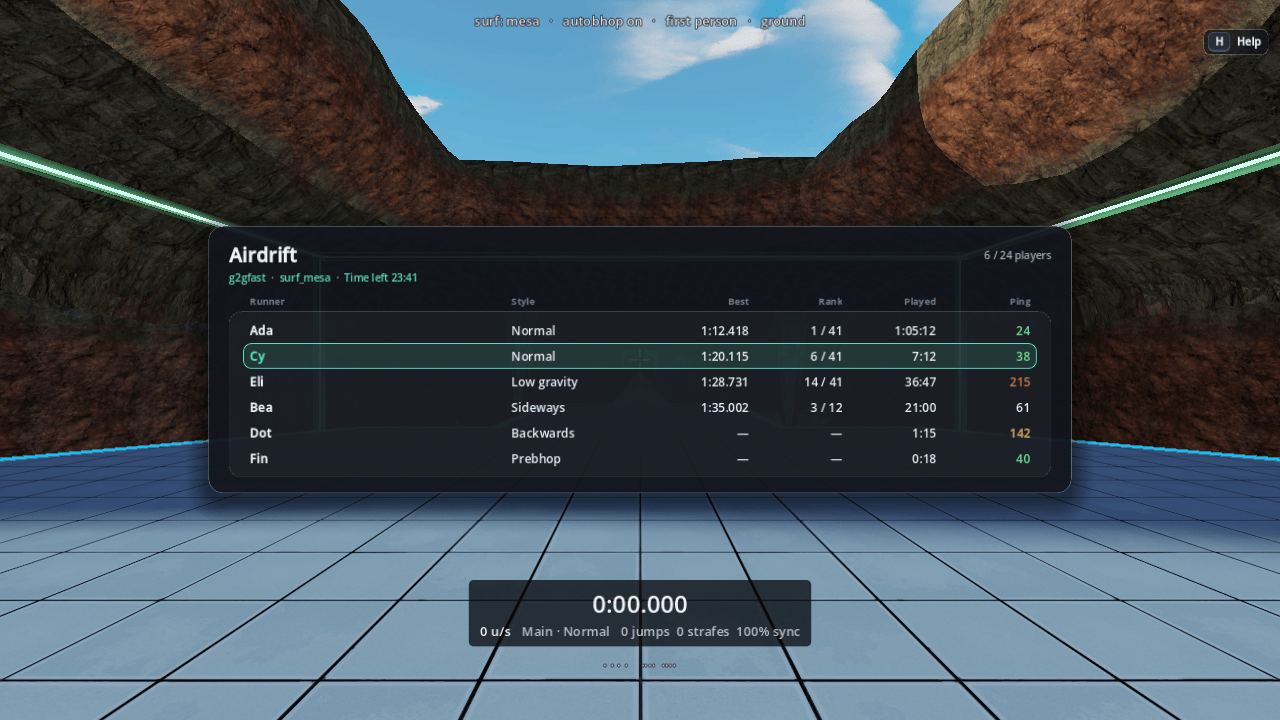 The scoreboard with each runner's style, best time and rank. |
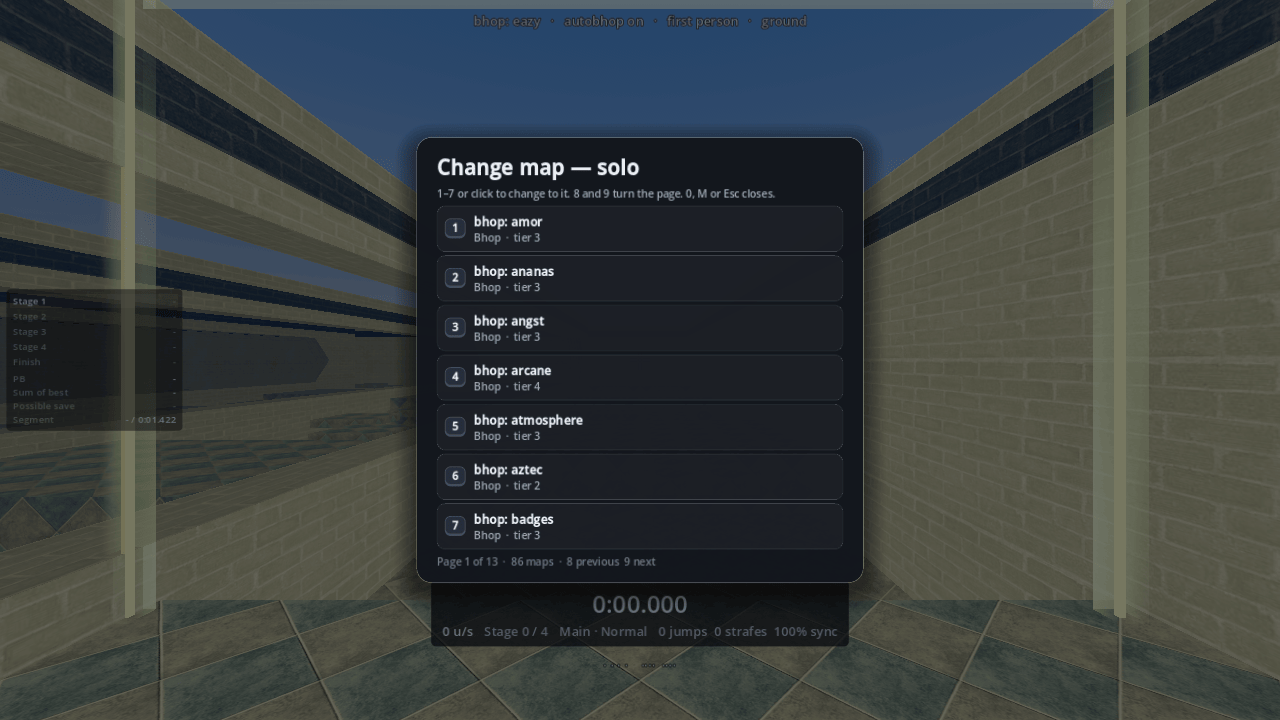 The map list, paged, with the course type and tier. |
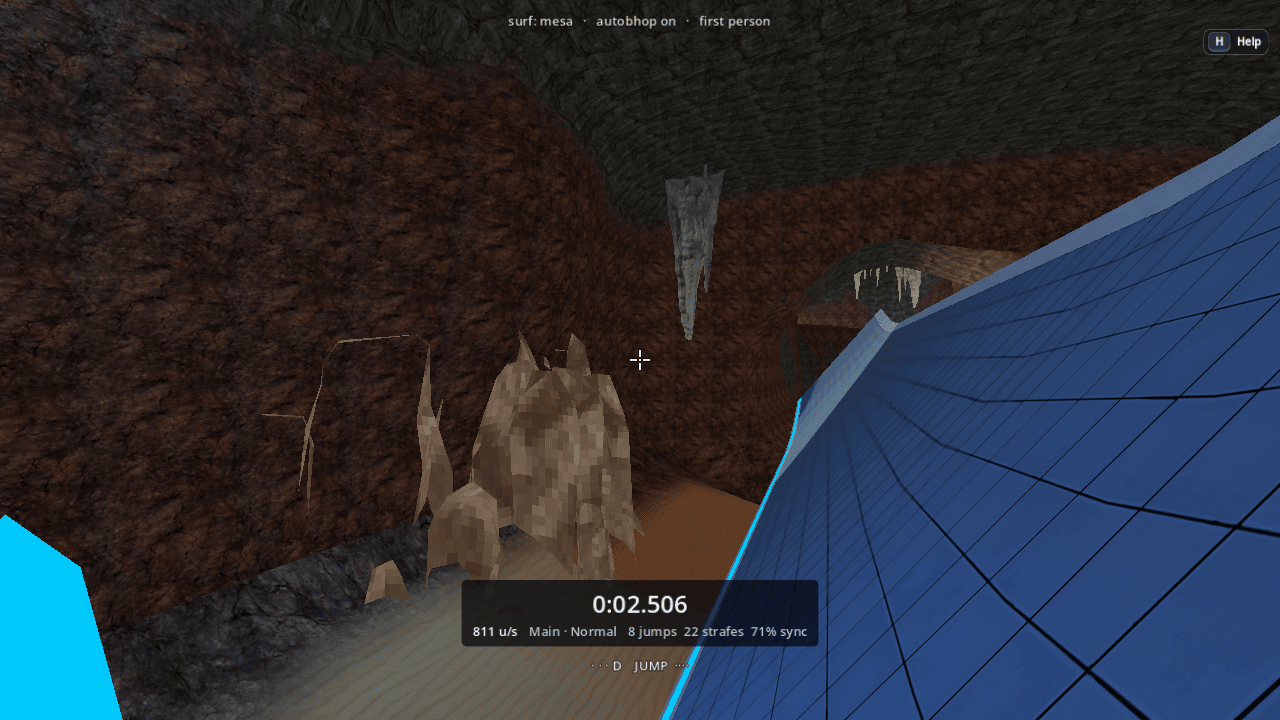 A converted Source map, with its own textures and sky. |
Each map has a start zone and an end zone. Leaving the start zone starts your timer; reaching the end stops it. Your best time on each map, track and style is a record, and the fastest on the server is the world record. Some maps have stages and bonus tracks.
Movement uses the classic units and cvars (sv_airaccelerate, sv_autobunnyhopping and so on), so surfing and strafing feel familiar.
Styles make a run harder: normal, sideways, half-sideways, backwards, low gravity and prebhop. A run made with an admin's help (noclip, a speed change and so on) is never saved.
The game ships with three maps: bhop_g2g_intro, bhop_g2g_stages and surf_g2g_intro. The classic maps live in airdrift-maps, and a server downloads them on demand.
Every key can be rebound under Esc, Controls; bindings are saved on your device.
| Key | Action |
|---|---|
| WASD | Move |
| Space | Jump (hold it if the server allows auto-hop) |
| Ctrl | Duck |
| F5 | First or third person |
| F | Flashlight (only you see it) |
| O | Hide every other player and the record ghost |
| Tab (hold) | Scoreboard: style, best time and rank on this map, time on the server, ping |
| N | Change style |
| R | Back to the start of your stage (or track). Press twice quickly for the main start zone |
| C / V | Save a practice checkpoint / go back to it |
| Y / U | Chat / team chat |
| M | Map list: pick a map with 1-7 or a click, 8 and 9 turn the page. See "Map changes" below |
| Z | Zone editor (offline, or an admin); see Zones |
| H | Help: every key and chat command |
| P | Next HUD theme |
| Left / right click | While spectating: previous / next player |
| G | While spectating: free camera (WASD, Space / Ctrl up and down, Shift fast, Alt slow), and back onto a player |
| Esc | Menu: settings, key bindings, help |
| ` | Console; settings lists every setting |
Map changes (M). Offline, and on a server you started yourself, the choice changes the map. On a public server staff change it (sv_map_menu_flag picks the admin flag), the only player on the server changes it too (sv_map_menu_alone, on by default), and anybody else's choice is a vote of the players there (at least sv_map_menu_vote_min, default 2; bots never count).
Menu options. Under Esc, HUD & theme you pick one of six themes, switch each timer line on or off, set its size and corner, and drag the timer, keys, status line and spectator list wherever you want them (saved to your account). The menu also has your style, field of view, a frame-rate cap (unlimited by default), V-Sync, render scale and volumes. show_own_body 1 draws your own character in first person (off by default, also in the menu). In a browser, H also lists the keys the browser keeps for itself, such as Ctrl+W.
| Commands | What they do |
|---|---|
!r, !rs, !s <n>, !track bonus 1 |
Restart, restart this stage, go to stage n, pick a track |
!wr / !top, !pb [name], !rank, !rr, !wrcp, !prinfo |
Records: fastest times, personal best, rank, latest records, stage records, your attempts here |
!profile / !p, !players, !stats, !mapsdone, !mapsleft, !tier |
Profiles, who is online, stats, map progress, map tier |
!style, !rtv, !end, !pause, !unpause, !autorestart |
Style, map vote, end the run, pause, auto restart |
!restore |
Take back a run you dropped by disconnecting |
!spec, !spec <name>, !spec free, !spec off |
Watch whoever is furthest into a run, a named player, a free camera, or stop |
While you watch somebody, the list of others watching them is on the right. A server turns that off with sv_spec_list 0; you can hide it under Esc, HUD & theme.
You need Godot 4.7. The game is built from many GameSpice addons, each in its own repository. The easiest way to get everything is gs-bootstrap, which clones every project and links the addons in:
git clone https://github.com/gamespice-platform/bootstrap.git
cd gs-bootstrap
./bootstrap.sh
cd projects/game-airdrift
./game.sh
On Windows, run bootstrap.ps1 and open the project in Godot.
| Command | What it does |
|---|---|
./game.sh |
Play offline, in a window |
./game.sh online |
Start a local server and the browser client, and print the link |
./game.sh online down |
Stop them |
./game.sh server |
Start a local dedicated server only |
./game.sh test |
Check every script and run every test suite |
./game.sh help |
All options |
online and server use gs-server-deploy, which bootstrap clones next to this project. Run its ./setup.sh once first.
Settings are cvars. Set them in the server config, on the command line, or live from the console. cvarlist sv_ lists them all. The values below are the defaults.
| Cvar | Default | What it does |
|---|---|---|
sv_autobunnyhopping |
1 | Hold jump to keep hopping |
sv_airaccelerate |
1000 | Air acceleration for every map |
sv_gravity |
800 | Gravity |
sv_maxvelocity |
3500 | Speed limit |
sv_crestlaunch |
1.25 | Speed needed (times run speed) for a ramp top to launch you; 0 is never |
sv_allow_thirdperson |
1 | Players may use third person |
sv_flashlight |
1 | Players may use their own flashlight |
sv_spec_list |
1 | Players see who is spectating them; 0 makes spectating anonymous |
mp_freeroam |
1 | Spectators may fly a free camera; 0 keeps them on players |
mp_freeroam_speed |
12 | Free camera speed, metres a second |
mp_forcecamera |
0 | 1 or 2 restricts the camera and switches free roam off |
sv_stagger_snapshots |
0 | 1 spreads snapshot work over the ticks between snapshots (lower worst tick on a full server) |
sv_replay_bot |
1 | The server record runs as a visible ghost |
sv_map_sync_timeout |
30 | Seconds a map change waits for slow clients |
sv_deathmatch |
0 | Players can shoot each other |
mp_killcam_time |
7 | Seconds of final killcam when a deathmatch ends (0 is off) |
sv_hunters |
0 | Monsters walk the course |
sv_props |
0 | Players can place practice blocks |
sv_ragdoll |
1 | A dead player falls as a ragdoll; 0 is a quick fall |
sv_map_rotation_file |
cfg/maps.yml |
Which installed maps rotate |
airdrift_zone_editor_max_number |
99 | Highest stage or checkpoint number the editor's ] reaches; default 99, 0 = unlimited. Past it the key refuses with a notice |
airdrift_zone_editor_max_height |
2048 | Tallest zone the editor builds, in units; default 2048, 0 = unlimited. Past it the editor refuses with a notice |
airdrift_zone_mark_max_height |
4096 | Tallest zone airdrift_zone_mark x y z height accepts; default 4096, 0 = unlimited. A taller request is refused, never shortened |
mp_teamblock / mp_enemyblock |
0 / 1 | gs-team block rules, with !block and !noblock. Runners are not solid to each other, so these matter only once players are made solid |
A player killed in deathmatch or by a hunter falls as a ragdoll (gs-player-char) until they are back at the start. sv_ragdoll_style picks ragdoll, stiff, topple or hide; sv_ragdoll_time and sv_ragdoll_max say how long and how many; sv_ragdoll_reactions weights the falls.
Each field of the server configuration (game/airdrift_config.gd, with its description and range) is also an airdrift_<field> cvar, unless it already has an sv_ one. Layers, weakest first:
- the code default
cfg/game/game-airdrift/config/game.ymlcfg/server/game/game-airdrift/config/game.ymlAIRDRIFT_*environment (the oldG2G_*is still read; the new one wins)--airdrift-*arguments (the old--g2g-*likewise)- live cvars and the workbench
A dedicated server refuses to start on an unknown key or a bad value. Per-map movement lives in cfg/game/game-airdrift/gs_map/map/<map>.yml. airdrift_config_dump lists every field with the layer it came from; airdrift_config_diff save writes what you changed as a file to copy into the defaults. The gs-workbench tuning panel (F9 in debug builds; workbench http for a loopback page when workbench.enabled is set in cfg/server.yml) edits the same fields. An exported build needs *.html in the preset's include_filter.
List the maps you want in cfg/maps.yml (named rotations, wildcards and sv_map_rotation <name>; see gs-map docs/rotation.md). A map you leave out stays installed: airdrift_map <id> still loads it and M lists it as "not in rotation", but it never comes round on its own and is not offered in votes.
mode: random          # or sequential
cooldown: 2           # maps that must pass before one comes back
maps:
  - bhop_eazy
  - bhop_evolve
- surf_mesa.yaml, .json ({"maps": [...]} or a plain list) and one-map-per-line .txt, .cfg or .ini files also work. With no file every map rotates, except combat surf maps. airdrift_maps_reload re-reads it. Played offline alone, a map has no time limit; --airdrift-offline-map-seconds 1800 sets one.
When the map changes, every client is told first, downloads the map if it needs to, and the server switches once everybody is ready (or after sv_map_sync_timeout).
| Command | What it does |
|---|---|
airdrift_status |
What the server is doing |
airdrift_map <id> |
Change the map, or list them with no id |
airdrift_maps_reload |
Pick up maps added to maps/ without a restart |
airdrift_top |
Fastest times on this map |
airdrift_ghost |
What the record ghost is running |
airdrift_vote |
Open a map vote now |
airdrift_hunt [clear|spawn <id>] |
Show, clear or place hunters |
airdrift_place_clear |
Clear every placed block |
airdrift_settier, airdrift_rescore, airdrift_deleterecord <name> [track] [style], airdrift_wipeplayer <id> |
Admin: record management |
Every command and cvar had an older g2g_ name, and that name still works: an old command runs the same handler (it is not listed), and an old cvar is an alias of the new one, so an existing server.cfg keeps working. Use the airdrift_ names in new configs; an old cvar name cannot take a value with spaces in it.
Records are kept in files under user://airdrift/records unless you give the server a database. SQLite needs the godot-sqlite extension. PostgreSQL and MySQL go through gs-sql's HTTP gateway, which lets several servers share one leaderboard. In the server config:
{
  "records_database": "mysql",
  "records_database_url": "http://10.0.0.5:8780",
  "records_database_token": "keep this in the file, not on the command line",
  "records_table_prefix": "gs_timer_",
  "records_cache_seconds": 10,
  "points_formula": "curve",
  "points_weighting": 0.975,
  "enforce_stages": true,
  "resume_seconds": 600,
  "report_to_backbone": false
}
points_formula is curve, tiered or placement. If the database will not open, the server logs an error and uses files for that session. With report_to_backbone on, times and ranking points are published to the server's page on GameSpice.
These come from gs-moderation: !noclip, !freeze, !slay, !blind, !beacon and the rest. Any run that noclip, speed or gravity touches is not saved. burn is turned off because there is nothing to burn on a course.
The next-map vote is gs-vote. The defaults (shown below) are in game/airdrift_vote.gd. To change them, create user://cfg/airdrift_vote.json, or use GS_VOTE_* environment variables or --vote-* arguments:
{ "end_vote": true, "vote_lead_sec": 120, "include_extend": true, "extend_seconds": 600, "max_extends": 3 }end_vote: false turns the end-of-map vote off and include_extend: false removes "extend" from the ballot. gs-vote's README lists every setting.
The importer reads BSP version 20 maps. Put the .bsp files in ../inspirations/airdrift/ and run:
tools/import_maps.sh      # imports anything new, skips what is current
tools/bsp_preview.sh      # renders each map from its spawn
Imported maps land in maps/imported/, a link to the airdrift-maps checkout. A running server picks up new ones with airdrift_maps_reload.
Collision comes from the map's brushes, so invisible player clips and surf ramp clips work as the mapper meant. Surfaces are coloured by angle: standable, slidey and wall each look different.
The map's own volumes work too: teleports keep your run going, boosters push, water is swum in (hold jump to come up), ladders are climbed, conveyors carry you, and a bunny-hop block sends you back if you stand on it. Blocks are timed per player. docs/brush-entities.md covers every brush entity.
Combat maps. Some surf maps are for fighting, not timing. Their zones file says "kind": "arena" and they live in fc-surf-dm-maps for Fatal Contact's deathmatch, not in airdrift-maps. tools/bsp_import.py writes such a map there. If one is installed here anyway it stays loadable, M marks it "combat", and it is left out of the rotation and the vote unless cfg/maps.yml lists it.
Most surf and bunny-hop maps name their own start, end, stages and bonuses, and the importer reads those. For a map that does not, write zones in maps/zones/<id>.json (see maps/zones/README.md) or draw them in the game.
Zones are glowing boxes: green start, red finish, amber stages, cyan and magenta for a bonus. Esc, General, Zones turns them off.
Z opens the zone editor. Aim at the floor; a marker snaps to a 16-unit grid.
| Key | What it does |
|---|---|
| 1-6 | Start, end, stage, checkpoint, stop, pit |
| T | Main track, bonus 1, bonus 2, ... |
| [ / ] | Stage or checkpoint number (up to 99 by default; airdrift_zone_editor_max_number, 0 = unlimited) |
| PgUp / PgDn, or the wheel | Height, 16 units at a time (128 by default, up to 2048; airdrift_zone_editor_max_height, 0 = unlimited) |
| E or click | Put a corner; the box follows your aim until the second |
| Backspace | Take the last zone back |
| Enter | Save |
| Z or Esc | Close |
Offline it saves to user://zones/<map>.json, which the game loads in place of the map's own zones. On a server it sends the server's zone commands for you (these need the changemap flag). The console works too:
airdrift_zone start          // start drawing a start zone
airdrift_zone_mark           // stand on one corner
airdrift_zone_mark           // then the other
airdrift_zone stage main 1   // the next zone: stage 1 of the main track
airdrift_zone_save           // write them to disk
airdrift_zone_undo removes the last one and airdrift_zone_list lists them.
./game.sh test                  # every script parses, then every suite runs
./game.sh test headless_run # one suite| Suite | What it covers |
|---|---|
headless_run |
Movement, the timer, zones, and bots running every built-in map |
headless_net |
A server and a client in one process |
headless_maps |
The map catalogue, map changes and the vote |
headless_presentation |
What a client draws and plays |
headless_stack |
The whole addon stack together |
headless_imported |
Every imported map loads and has its zones |
headless_mechanics |
Teleports, sinking blocks, pushes and water on every imported map |
headless_config |
Every config field as a cvar and a profile |
headless_workbench |
gs-workbench over the config: an edit, and the export as defaults |
dedicated |
A real server: boots, loads the game, runs its commands |
CLAUDE.md has the design decisions and the reasoning behind them.
The addons in addons/ come from the GameSpice platform: gs-achievements, gs-animation, gs-audio, gs-auth, gs-bot, gs-bot-record, gs-browser, gs-camera, gs-chat, gs-cloud, gs-combat, gs-console, gs-core, gs-effects, gs-entity, gs-fx, gs-game, gs-input, gs-leaderboard, gs-lighting, gs-loadout, gs-map, gs-match, gs-menu, gs-mobile, gs-moderation, gs-net, gs-npc, gs-npc-ai, gs-npc-ai-director, gs-peer-to-peer, gs-physics, gs-platform, gs-player, gs-player-char, gs-player-class, gs-player-controller, gs-profile, gs-profiler, gs-props, gs-replay, gs-save, gs-server, gs-server-query, gs-settings, gs-sim, gs-spawn, gs-spectate, gs-sql, gs-stats, gs-team, gs-timer, gs-ui, gs-user, gs-user-avatar, gs-voice, gs-vote, gs-weapon, gs-workbench. The SQLite records backend uses the godot-sqlite extension.
Every game below runs on the same GameSpice addons as this one, which makes them a good way to see what the platform can do.
| Game | What it is | Source |
|---|---|---|
| Fatal Contact | Fast first-person deathmatch with GunGame and classic Surf Deathmatch maps. | game-fatal-contact |
| Playlot | A physics sandbox: spawn props, NPCs and weapons and build whatever you like. | game-playlot |
| Hungario | Steer a hungry monster, eat to grow and outlast everyone else. | game-hungario |
| Buses From Hell | Survive one or more crazy bus drivers trying to run you over. | mg-buses-from-hell |
| Smash Copter | Stay on wobbly platforms while a cannon rains props down on you. | mg-smash-copter |
| Zombie Zone | Co-op zombie survival: escape through the city or survive waves. | game-zombie-zone |
| Hide n Seek | Hide as yourself; every hider caught joins the hunt. | game-hide-n-seek |
| Prop Hunt | Disguise as furniture and keep still while blindfolded hunters search. | game-prop-hunt |
| Murder Mystery | Everybody looks the same. One of them has a knife. | game-murder-mystery |
| Deathrun | Run a trap-filled course while the activators press every button they have. | game-deathrun |
| Wipeout | Obstacle courses over water: sweeper arms, big balls and a fight at the finish. | mg-wipeout |
| Dangerous Delivery | Haul loads up mountain roads with no guard rails. Riskier runs pay more. | mg-dangerous-delivery |
| Look At Me | Two dark houses, fifty levels, and witches walking every room. | mg-look-at-me |
Every game, its maps and its servers: zeesgames.com.
| Asset | Author / source | License | Where |
|---|---|---|---|
| Godot Engine logo (boot splash) | Andrea Calabró, godotengine.org | CC BY 4.0 | branding/splash.png |
| Prototype textures | Kenney, Prototype Textures | CC0 | textures/prototype/ (its README says which file came from where) |
| Players | Quaternius, Zombie Apocalypse Kit, coloured from Kenney's character kit skins | CC0 1.0 | gs-player-char |
| Avatar parts and hats | Kenney | CC0 | gs-player-char |
| Stand-in scenery | Kenney Food Kit, Holiday Kit, Nature Kit | CC0 | props/kenney/ |
| Stand-in textures | Kenney, Retro Textures Fantasy | CC0 | textures/stock/ |
| Concrete, metal and snow textures | Concrete034, Metal032, MetalPlates006, Snow010A from ambientCG, Lennart Demes | CC0 | textures/stock/ (LICENSE.txt lists every file) |
| Footsteps | Kenney, Impact Sounds | CC0 | gs-audio, addons/gs_audio/stock/CREDITS.md |
| Ambience beds | Generated by gs-audio | none (synthesized) | gs-audio |
| Imported maps | Their authors, credited in airdrift-maps | as stated there | airdrift-maps |
MIT. See LICENSE. The Kenney textures are CC0, which is public domain.