
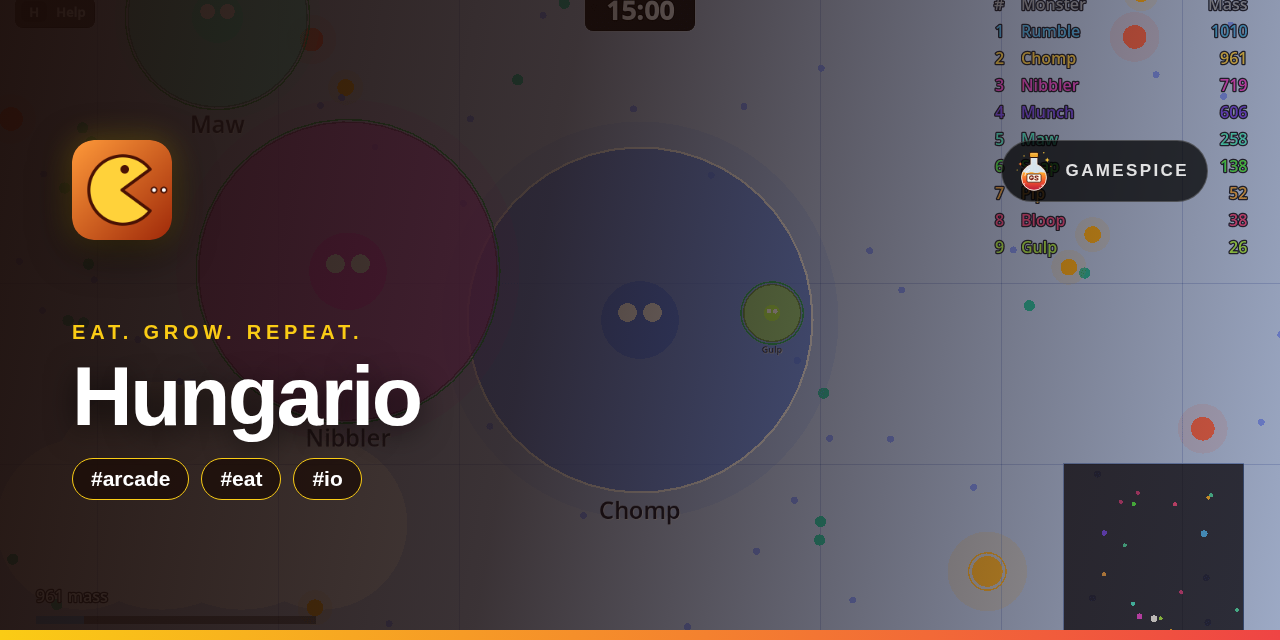
Hungario is a 2D multiplayer game about growing. You start as a small monster and get bigger by eating food and other players. Press Space to split in two and throw half of yourself at someone. It is inspired by the cell-eating browser games.

Play on the test server. It runs in a browser, on a phone, or on your computer.
Everything in this repository is open source under the MIT license. The only closed part is the website back-end it can sign in through. If you do not want to use GameSpice, you can plug in your own sign-in back-end.
Hungario is one of Zee's Games: open source multiplayer games built on the GameSpice platform, with live servers behind them. Claude Code built it, and the whole project is MIT. Please send bug reports to the issue tracker.
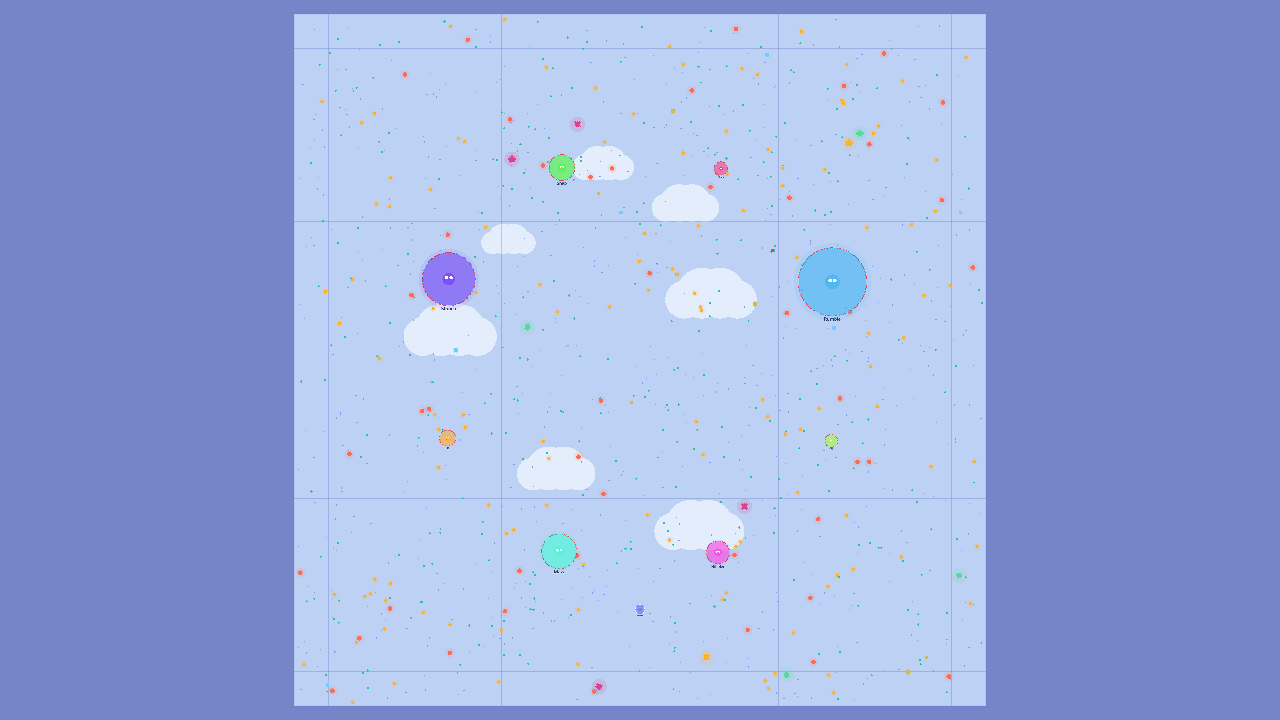 A mid-round Classic arena: nine monsters from a starting blob to a giant, with food and clouds. |
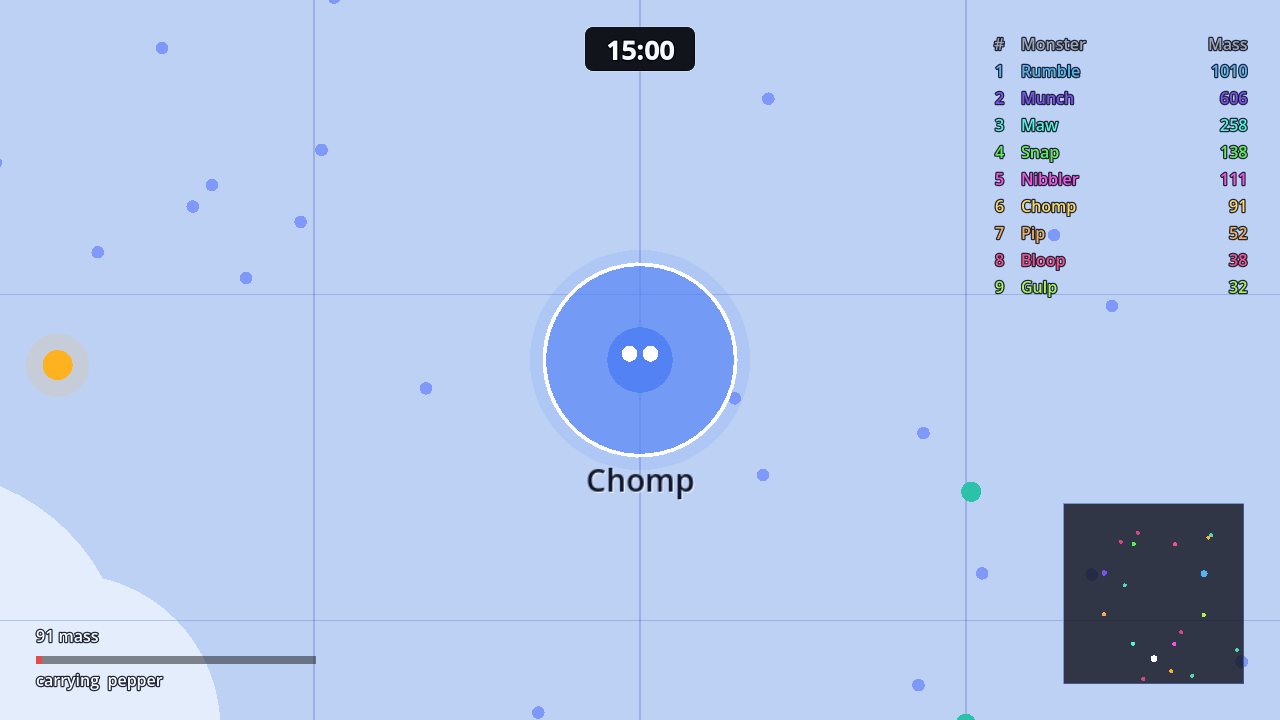 The HUD: round clock, leaderboard, your mass, the throwable you carry and the minimap. |
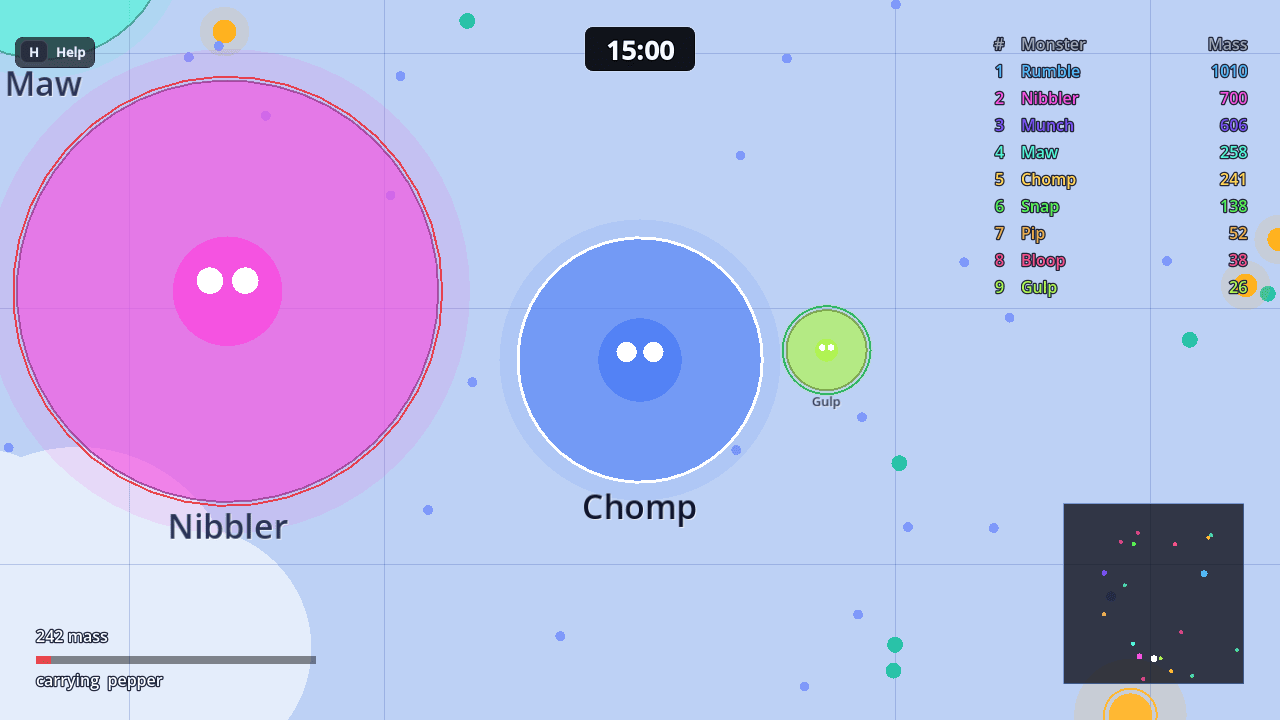 Rings tell you who is who: green around the small monster you can eat, red around the big one that can eat you. |
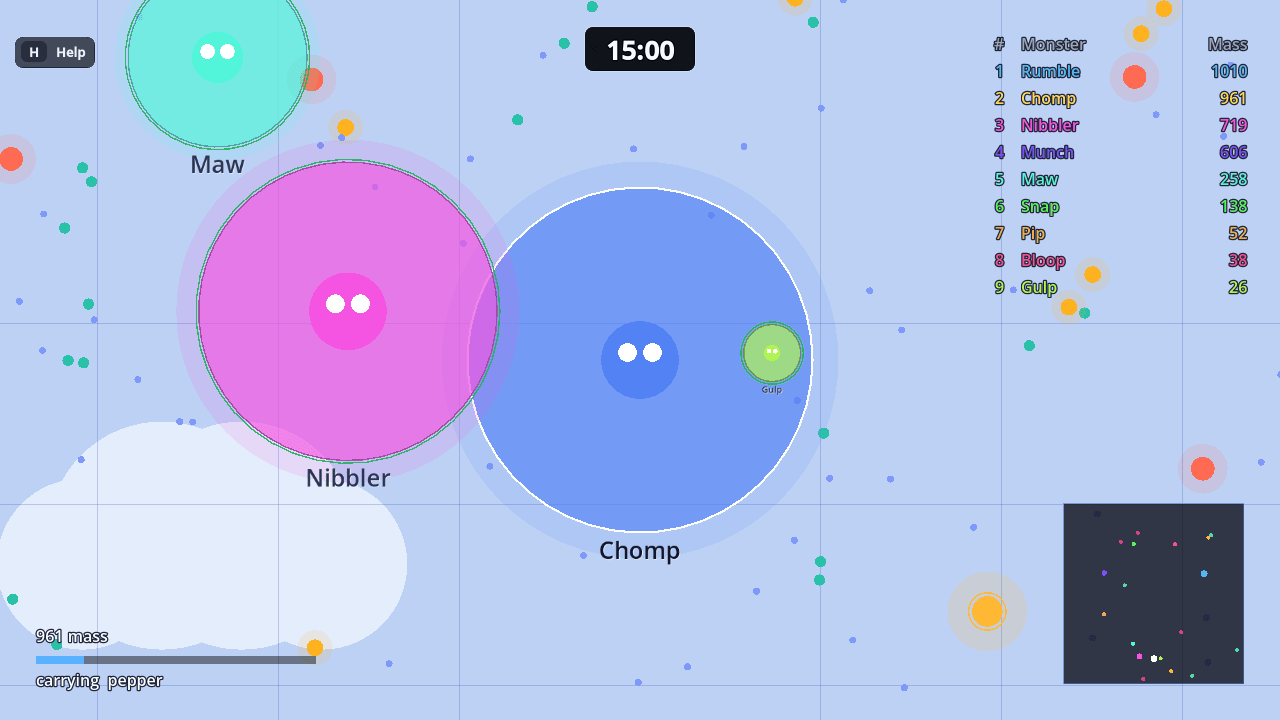 A grown monster zooms the camera out and still has to watch for bigger ones. |
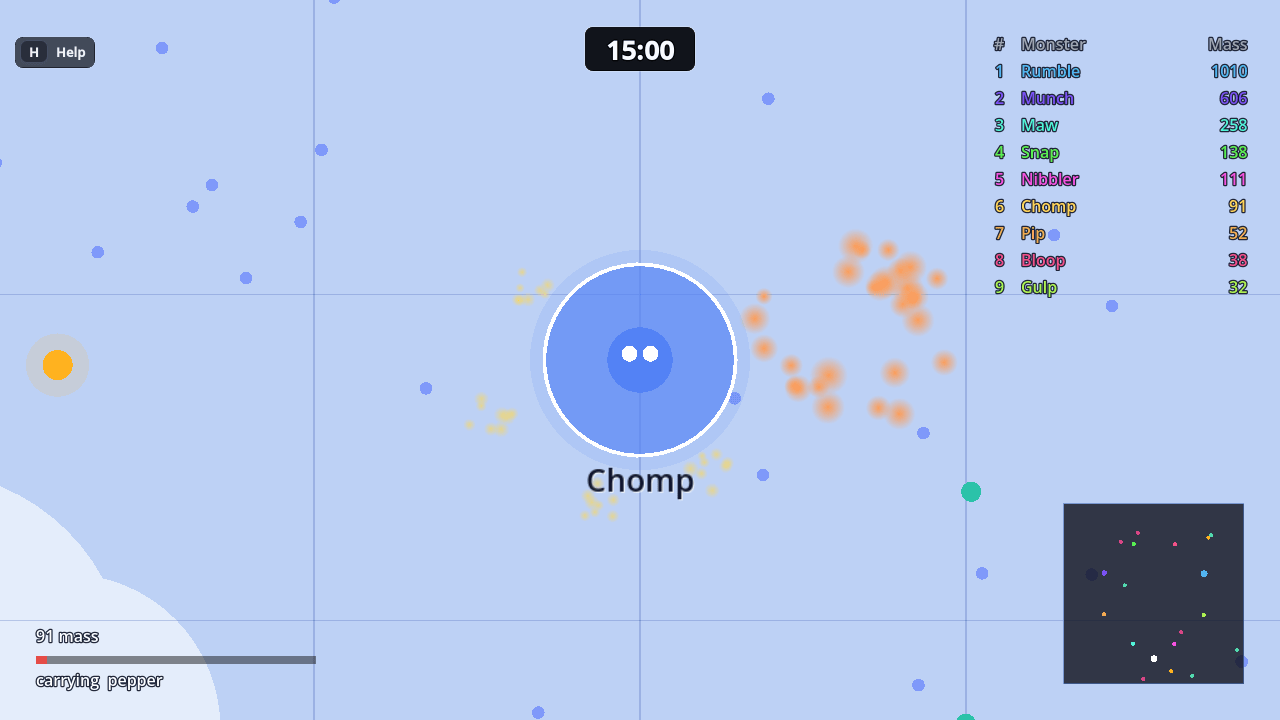 Food pops and pepper bursts around a monster as it eats and fights. |
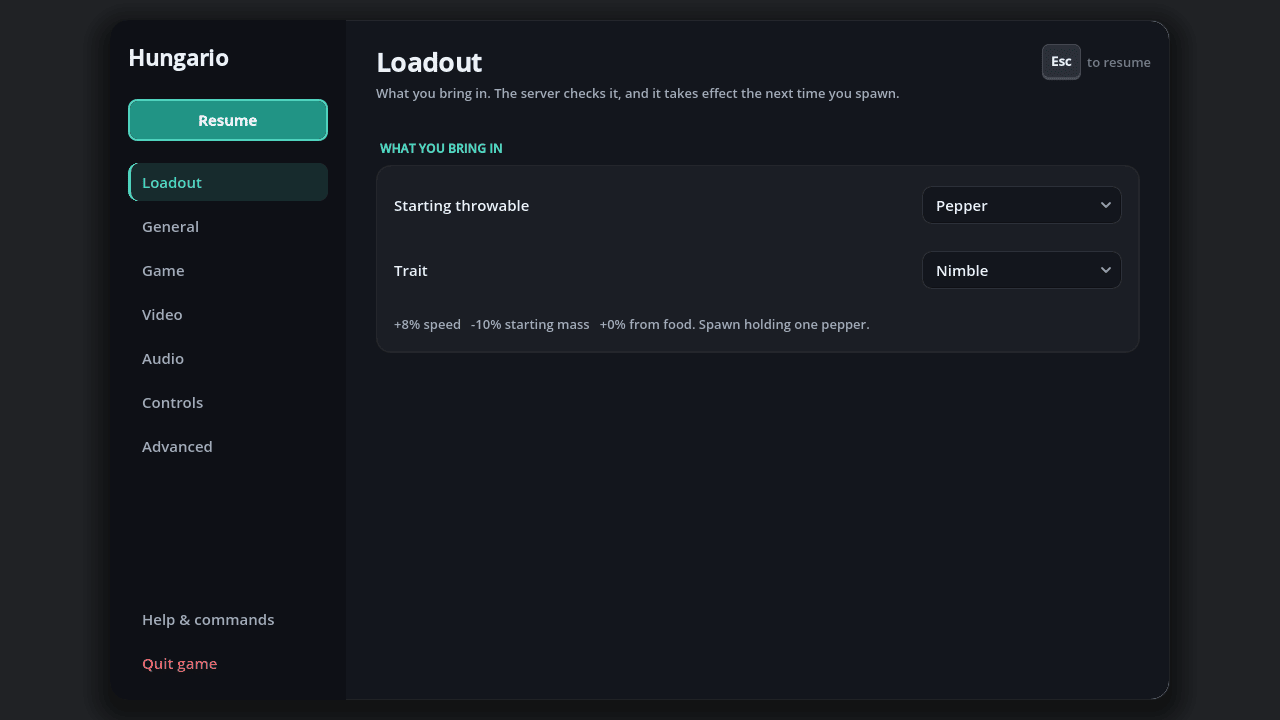 The loadout menu: choose a starting throwable and a trait before you spawn. |
Your mass is your size, your speed and your score. The bigger you are, the slower you move (twice the mass is about 26% slower). Your avatar rides on top of your monster.
- Eating. You can eat a monster once you have at least 25% more mass than it and you are mostly on top of it. Every monster has a ring: green if you can eat it, red if it can eat you.
- Food comes in four sizes. The big pieces are rare, so the fastest way to grow is eating other players.
- Fruit gives you 8 seconds of one effect: rush (faster), maw (eat players closer to your size) or rind (absorbs one burst).
- Throwables are picked up off the ground. A pepper bursts whoever it hits into five pieces, a frostberry slows them for 5 seconds, and a lure drops a ring of food where it lands.
- Splitting throws half of you forward. Your pieces cannot merge for 16 seconds, so each one is easier to eat.
- Ejecting spits out a little mass, which makes you smaller and faster.
- Loadout. Before you spawn, pick a starting throwable and a trait: nimble (faster, smaller start), sturdy (bigger start, slower) or greedy (more from food, smaller start).
Mass above 260 slowly decays, so you cannot park in a corner. When you are eaten, you watch whoever ate you until you respawn. A round ends when someone reaches 2400 mass or the time runs out (15 minutes by default, shorter in most modes).
| Mode | Console id | What it is |
|---|---|---|
| Classic | hungry_classic |
The standard square play field. |
| Frenzy | hungry_frenzy |
Small, fast and over quickly. |
| Gauntlet | hungry_gauntlet |
A long, narrow corridor. Offered in the vote only with 3 or more players. |
| Warrens | hungry_warrens |
A square with rocks and refuges in it. |
| Reef | hungry_reef |
A wall with four channels through it, tight at one end and open at the other. |
| Shallows | hungry_shallows |
Lines of posts whose gaps narrow the further in you go, so only small monsters reach the middle. |
| Famine | hungry_famine |
Scarce food, plenty of peppers and items. |
| Feast | hungry_feast |
Food everywhere, few peppers, long merges. |
| Key | Action |
|---|---|
| Mouse | Steer. The further the cursor, the faster you go. Put it on yourself to pull your pieces back together. |
| Space | Split |
| W | Eject mass |
| Q | Throw what you are holding |
| Tab (hold) | Scoreboard: every monster ranked by mass, with pieces, time on the server and ping |
| Y / U | Chat / chat with nearby players |
| H | Help: the goal, the modes and every key as you have it bound |
| Esc | Menu: loadout, settings, controls, help and leave |
On a phone, drag to steer. There are buttons for split and throw.
You need Godot 4.7. The game uses many GameSpice addons, each in its own repository. The easiest way to get everything is gs-bootstrap, which clones each project and links the addons into it:
git clone https://github.com/gamespice-platform/bootstrap.git
cd gs-bootstrap
./bootstrap.sh
cd projects/game-hungario
./game.sh
On Windows, run bootstrap.ps1 instead and open the project in Godot.
| Command | What it does |
|---|---|
./game.sh |
Open the launcher. Pass -- --offline to play against bots. |
./game.sh online |
Start a local server (Classic) and the browser client, and print the link to open. |
./game.sh online hungry_reef |
The same, in another mode (any id from the mode table). |
./game.sh online down |
Stop them. |
./game.sh server |
Start a local dedicated server only. |
./game.sh test |
Check every script and run every test suite. |
./game.sh help |
List all options. |
online and server use gs-server-deploy, which bootstrap clones next to this project. Run its ./setup.sh once first.
Settings are console variables ("cvars"). Set them in the server's config files, on the command line, or live from the console. cvarlist hungry_ lists all of them. Every server setting is named hungry_<name>.
| Setting | Default | What it does |
|---|---|---|
max_players |
32 | Player slots (1 or more, no upper limit in the game). Changing it needs a restart. |
bot_quota |
6 | How many bots keep the server full. Each person who joins replaces one. |
bot_quota_mode |
fill |
fill, fixed (that many bots), per_player (that many per person) or off. |
bot_difficulty |
medium |
easy, medium, hard or nightmare. |
hungry_hunters_on |
0 | 1 releases NPC hunters into the world. |
hungry_hazards_count |
0 | Rocks scattered into the world at each map load, within the two budgets below. Any value. |
hungry_hazards_per_owner |
24 | Rocks one owner (an admin, the director) may have out at once. Any value, 0 = unlimited. |
hungry_hazards_world_budget |
64 | Rocks in the world at once, from everybody. Any value, 0 = unlimited. |
hungry_outgrown |
empty | What happens to a monster stuck in a refuge it outgrew: accept, cap or eject. Empty uses the mode's own rule. |
hungry_fruit_effect_sec |
8 | Seconds a fruit effect lasts. |
hungry_frost_sec |
5 | Seconds a frosted monster is slowed. |
hungry_pepper_damage |
100 | Pepper damage at point blank. |
hungry_max_pieces |
16 | Most pieces one monster may split into. Any value, 0 = unlimited. |
hungry_lure_food_count |
26 | Food a lure drops. |
hungry_throw_cooldown_ticks |
24 | Ticks between two throws (60 ticks per second). |
hungry_respawn_delay_sec |
3 | Seconds a dead player waits before respawning. |
hungry_spawn_protection_sec |
3 | Seconds of protection after a spawn. |
hungry_avatar_pack |
empty | Manifest URL for this server's rider content. |
sv_ragdoll |
1 | An eaten monster collapses and may be thrown. 0 just shrinks it. |
Other options (speed multipliers, cooldowns, intermission length, hunter speed) are listed by cvarlist hungry_. The same settings can live in three config files, cfg/game/game-hungario/config_arena/game.yml, config_play/game.yml and config_server/game.yml. Every key is shipped commented out at its default. To override one on a server, copy the file to cfg/server/game/game-hungario/ and uncomment the line. A server refuses to start if a config has an unknown key. hungry_config_diff save writes your edits out as a file you can ship as the new defaults. The F9 workbench shows the same settings as rows in the game.
Each mode has its own file, cfg/game/game-hungario/mode_<id>/<id>.yml, with its world size, food and item counts, win mass, time limit and refuge rule. Changes apply from the next mode change.
A mode's top speed and merge delay stay in code. The client predicts movement with them, and the server sends them to clients when they join.
hungry_bots N still works but is deprecated. It sets bot_quota N and bot_quota_mode fixed. Offline, bot settings are console variables, or pass for example -- --bot_difficulty hard at launch.
| Command | What it does |
|---|---|
hungry_status |
Show the world, the food and the network. |
hungry_top |
Show the leaderboard (also works in chat). |
hungry_restart |
Restart the round. |
hungry_loadouts |
Show what everybody brought in. |
hungry_hunters [on|off|clear] |
Control the NPC hunters. |
hungry_hazards [scatter <n>|clear] |
Rocks, spikes and lures. |
hungry_give <player> <pepper|frost|lure> |
Give somebody a throwable (needs cheats). |
hungry_burst <player> |
Blow somebody apart (needs cheats). |
changegame hungry_frenzy |
Switch mode without dropping anybody. |
votemap hungry_frenzy |
Let the players vote on a mode. |
Admin commands come from gs-moderation; modtools lists what this game supports. blind <player> [on|off|seconds] blacks out a player's screen, and beacon <player> [on|off] rings their monster on every screen. Both last through being eaten.
Players vote on the next mode with gs-vote. The defaults are in game/hungry_maps.gd. To change them, put a file at user://cfg/hungry_vote.json, or use GS_VOTE_* environment variables or --vote-* arguments:
{ "end_vote": true, "vote_lead_sec": 120, "include_extend": true, "extend_seconds": 300, "max_extends": 2 }end_vote: false turns the end-of-mode vote off. include_extend: false removes "extend" from the ballot. The gs-vote README lists every setting.
Esc opens the menu: loadout, camera, zoom, minimap, names, feed and threat rings (Game), window and frame rate, volumes, and every key (Controls). Settings are saved to user://hungry_settings.
The rider on your monster is your avatar from the platform. Its parts come from a signed content pack if the server has one, from the game itself if not, and are drawn from plain colours if there is neither. To build and publish an avatar pack:
godot --headless --path . res://tools/publish_avatars.tscnweb/README.md explains the browser build. In short, the server must listen on WebSocket (browsers have no UDP), and an HTTPS page needs a wss:// address.
./game.sh test                    # every script parses, then every suite runs
./game.sh test headless_round # one suite| Suite | What it covers |
|---|---|
headless_config |
Server settings and their config files |
headless_workbench |
The F9 workbench rows |
headless_mapcfg |
Per-mode config files |
headless_round |
Eating, splitting, throwables, modes, a whole round |
headless_touch |
Phone controls |
headless_net |
A server and a client in one process, over the network code |
headless_presentation |
What a client draws and plays |
headless_stack |
All the addons together |
headless_workshop |
The workshop (content) flow |
content |
Publishing, fetching and wearing an avatar pack |
sandbox |
Two real clients on a real server |
dedicated |
A real server: boots, loads the game, runs its commands |
CLAUDE.md has the contributor rules. docs/ has the design decisions.
The addons in addons/ come from the GameSpice platform: gs-2d, gs-achievements, gs-animation, gs-audio, gs-auth, gs-bot, gs-bot-record, gs-browser, gs-camera, gs-chat, gs-cloud, gs-combat, gs-console, gs-core, gs-fx, gs-game, gs-input, gs-leaderboard, gs-loadout, gs-map, gs-match, gs-menu, gs-moderation, gs-net, gs-npc, gs-npc-ai, gs-npc-ai-director, gs-peer-to-peer, gs-physics, gs-platform, gs-player, gs-player-char, gs-player-class, gs-player-controller, gs-profile, gs-profiler, gs-props, gs-save, gs-server, gs-server-query, gs-settings, gs-sim, gs-spawn, gs-spectate, gs-sql, gs-stats, gs-team, gs-ui, gs-user, gs-user-avatar, gs-voice, gs-vote, gs-weapon, gs-workbench. The SQLite records backend uses the godot-sqlite extension.
All of these share the same GameSpice addons, so they are the best place to see what the platform can do.
| Game | What it is | Source |
|---|---|---|
| Fatal Contact | Fast first-person deathmatch with GunGame and classic Surf Deathmatch maps. | game-fatal-contact |
| Airdrift | Bunny hop and surf timer runs with Source-style movement and leaderboards. | game-airdrift |
| Playlot | A physics sandbox: spawn props, NPCs and weapons and build whatever you like. | game-playlot |
| Buses From Hell | Survive one or more crazy bus drivers trying to run you over. | mg-buses-from-hell |
| Smash Copter | Stay on wobbly platforms while a cannon rains props down on you. | mg-smash-copter |
| Zombie Zone | Co-op zombie survival: escape through the city or survive waves. | game-zombie-zone |
| Hide n Seek | Hide as yourself; every hider caught joins the hunt. | game-hide-n-seek |
| Prop Hunt | Disguise as furniture and keep still while blindfolded hunters search. | game-prop-hunt |
| Murder Mystery | Everybody looks the same. One of them has a knife. | game-murder-mystery |
| Deathrun | Run a trap-filled course while the activators press every button they have. | game-deathrun |
| Wipeout | Obstacle courses over water: sweeper arms, big balls and a fight at the finish. | mg-wipeout |
| Dangerous Delivery | Haul loads up mountain roads with no guard rails. Riskier runs pay more. | mg-dangerous-delivery |
| Look At Me | Two dark houses, fifty levels, and witches walking every room. | mg-look-at-me |
Every game, its maps and its servers: zeesgames.com.
| Asset | Author / source | License |
|---|---|---|
| Godot Engine logo (boot splash) | Andrea Calabró, godotengine.org | CC BY 4.0 |
| Game sounds | Generated when the game starts | None needed (synthesized) |
| Ambience bed | Generated by gs-audio (see addons/gs_audio/stock/CREDITS.md) |
CC0 |
If you made one of these assets and want it removed, open an issue.
MIT. See LICENSE.